








Someone buys your course at 11 p.m. They're tagged, the welcome series starts, and the first lesson is in their inbox before you wake up.
Sell from your landing pages and your emails
Connect Stripe once. Ask for a payment button. Get paid on the page, and watch every buyer join your list.
AWeber ecommerce lets you take payments on a landing page and from an email. You connect Stripe once, ask the AI Landing Page Builder for a payment button, and visitors pay without leaving your page. Each buyer joins your email list the moment they pay.
Start selling free- What you can sell
- Ebooks and PDFs, courses and programs, memberships, webinar and event access, templates, services, gift cards, tips and donations
- Ways to take payment
- Stripe (built in), Shopify Buy Button, PayPal, or a payment link from another provider
- Payment types
- One-time, subscription, and split payments
- Plans that include ecommerce
- Free, Lite, Plus, and Unlimited
- Our fee per sale
- 1.0% on Free and Lite. 0.6% on Plus and Unlimited. Your payment processor's fees are separate.
- What happens to the buyer
- Added to your list right away when they pay through Stripe
Stripe
Take payments on a landing page with Stripe
You have something to sell and no store to sell it in. One landing page with a payment button is enough to start.
- Connect your Stripe account. You do this once, and it works on every page you build.
- Create your product in Stripe with a one-time price.
- Open the AI Landing Page Builder and type what you want. For example, "Add a payment button for my $50 gift card."
The builder adds a button that matches the style of your page. Your visitor pays right there, without leaving. Their details go straight to your list.
Selling a subscription or a payment plan? Build the page in the drag-and-drop editor instead. Its Ecommerce element takes one-time, subscription, and split payments, and you set the product name and price inside the editor.
The drag-and-drop order form is yours to shape. Have it pop up when the page loads, collect a shipping address, and rewrite the receipt page your buyer sees.
Stripe needs a verified bank account before it processes a charge. It may also ask you to confirm your identity.
What you can sell
- Ebooks and PDFs
- Access to a webinar or event
- Memberships
- How-to guides, illustrations, and templates
- A course or program you built
- Gift cards, deposits, and services
- Tips and donations
Shopify
Put your Shopify products on a landing page
Your landing page got them interested. Keep them there while they shop.
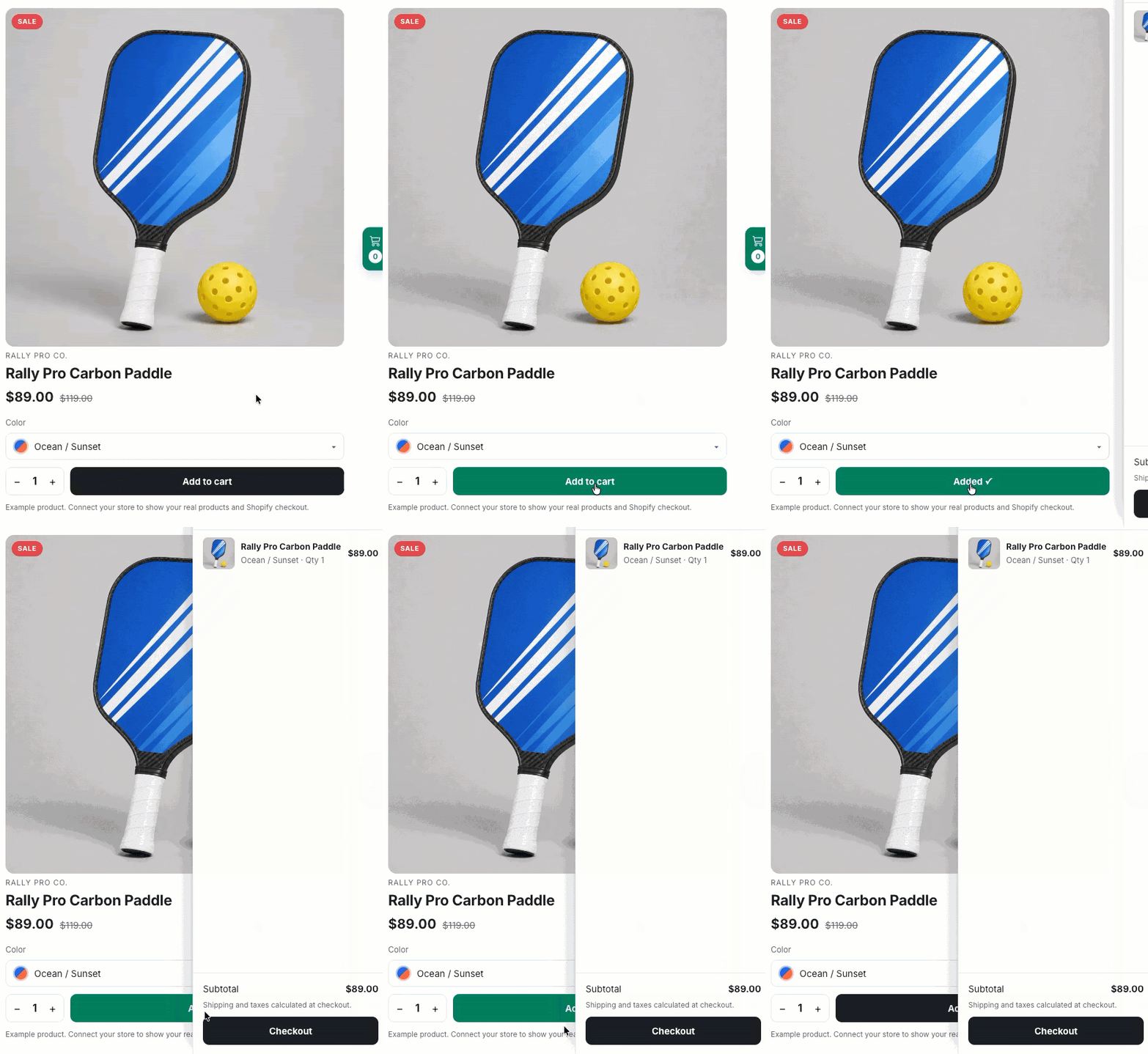
Ask the AI Landing Page Builder to sell your Shopify product. It adds a product card with the photo, price, options, and quantity, plus a slide-out cart. Your shopper picks a color and adds to cart without leaving your page.
Copy this prompt into the builder:
Sell my Shopify product on this page with a Buy Button: product photo, price, color options, quantity and a slide-out cart.
Then add three details from Shopify to the end of it. Your store address, your Buy Button access token, and the product ID.
Build a page for one product, a launch, or a holiday sale, and you have a small storefront in minutes. Your products and prices stay in Shopify, so you manage them in one place.
Use Shopify for physical products with stock to track or more than one option. The built-in Stripe checkout doesn't cover those.
Email
Put a buy button in your email
Your subscriber is already reading about the offer. Let them buy from the same email.
Add a buy button for your product to any email you send. One click opens the checkout for that product, ready for payment. There's no sales page in between.
Picture a Friday email about your new $19 workbook. Your subscriber reads it, clicks Buy, pays, and gets on with their day.
More ways to get paid
Use PayPal or a checkout you already have
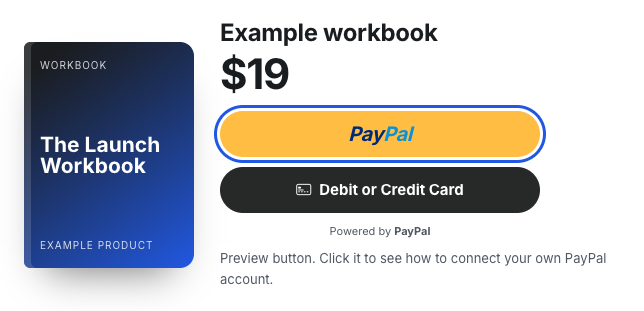
Prefer PayPal? Ask the AI Landing Page Builder, "Add a PayPal button so visitors can buy the workbook for $19." You get a working Buy Now or Subscribe button that takes payment on the page.
Already have a checkout somewhere else? Paste a Stripe Payment Link or any provider's checkout link into the chat and ask for a button. The button sends your visitor to that page to pay.
Buyers who pay through an outside payment link don't join your list on their own. Connect that provider with an integration such as Zapier, or use the built-in Stripe option.
| Option | Where your buyer pays | A good fit when |
|---|---|---|
| Stripe, built in | On your landing page | You sell digital products, services, gift cards, or subscriptions |
| Shopify Buy Button | Product card and cart on your landing page | You sell physical products with options and stock |
| PayPal button | On your landing page | Your buyers like paying with PayPal |
| Payment link | The provider's own checkout page | You already have a checkout you like |
After the sale
What happens after someone buys
A sale is the start of the relationship. Your list picks it up from there.
- Your buyer joins your list. Anyone who pays through Stripe on your page is added right away. No export, no import.
- A tag marks what they bought. Tag buyers by product, then send to the people who own the course and skip the ones who don't.
- An automation takes over. Connect a product to a workflow and your delivery email, welcome series, or next offer goes out on its own.
- Your sales show up in your account. See what sold from each landing page. Add our tracking script to your own site to count sales that happen there too.
Pricing
Fees and limits
Ecommerce comes with every plan. We take a small percentage of each sale, and your payment processor charges its own fee on top.
| Plan | Our fee per sale | Landing pages |
|---|---|---|
| Free | 1.0% | 1 |
| Lite | 1.0% | 3 |
| Plus | 0.6% | Unlimited |
| Unlimited | 0.6% | Unlimited |
A few limits to know before you build:
- The AI Landing Page Builder adds products that already exist in your Stripe account, with one-time prices. For subscriptions and payment plans, use the drag-and-drop editor.
- The built-in Stripe checkout doesn't support per-seat or metered billing, inventoried physical goods, or products with multiple SKUs. Use the Shopify Buy Button for those.
- Product names can run up to 50 characters.
- Removing the "Powered by AWeber" mark from your order form takes a Plus plan.
- The AI Landing Page Builder is in beta and open to every account.
Questions people ask
Can I sell products with AWeber?
Yes. AWeber lets you take payments on a landing page through Stripe, PayPal, or a Shopify Buy Button, and from a buy button in an email. Ecommerce is included on the Free, Lite, Plus, and Unlimited plans.
Does AWeber work with Shopify?
Yes. The AWeber AI Landing Page Builder can add a Shopify Buy Button to a landing page. Your visitor sees a product card with the photo, price, options, and quantity, plus a slide-out cart, without leaving the page.
Can I put a buy button in an email?
Yes. You can add a buy button to an AWeber email. One click opens the checkout for that product, with no sales page in between.
How much does AWeber charge per sale?
AWeber charges 1.0% per transaction on the Free and Lite plans and 0.6% on the Plus and Unlimited plans. Your payment processor, such as Stripe, charges its own fee separately.
Do I need a website to sell with AWeber?
No. AWeber hosts your landing page for you, on an AWeber address or on your own custom domain. You can share the link or its QR code anywhere.
Can I sell subscriptions and payment plans?
Yes. The Ecommerce element in the AWeber drag-and-drop landing page editor supports one-time, subscription, and split payments through Stripe. The AI Landing Page Builder supports one-time Stripe payments today, plus PayPal Buy Now and Subscribe buttons.
Can I sell physical products?
Yes, with the Shopify Buy Button. Shopify handles products with stock and multiple options, which the built-in Stripe checkout in AWeber doesn't support.
What happens after someone buys?
A buyer who pays through Stripe on an AWeber landing page is added to your email list right away. You can tag them by product and start an automated workflow, such as a delivery email or a welcome series.
What do I need to get started?
An AWeber account on any plan and a Stripe account with a verified bank account. Connect the two once, create your product in Stripe, and ask the AI Landing Page Builder for a payment button.
Make your first sale from a landing page
Ecommerce comes with every plan, including Free. Connect Stripe, ask for a payment button, and share your page.
Start selling free