Stop guessing and start testing: Improve your emails with A/B split testing
By Kaleigh Moore May 16, 2023
In a world where people are bombarded with countless emails on a regular basis, it’s more important than ever to craft emails with purpose.
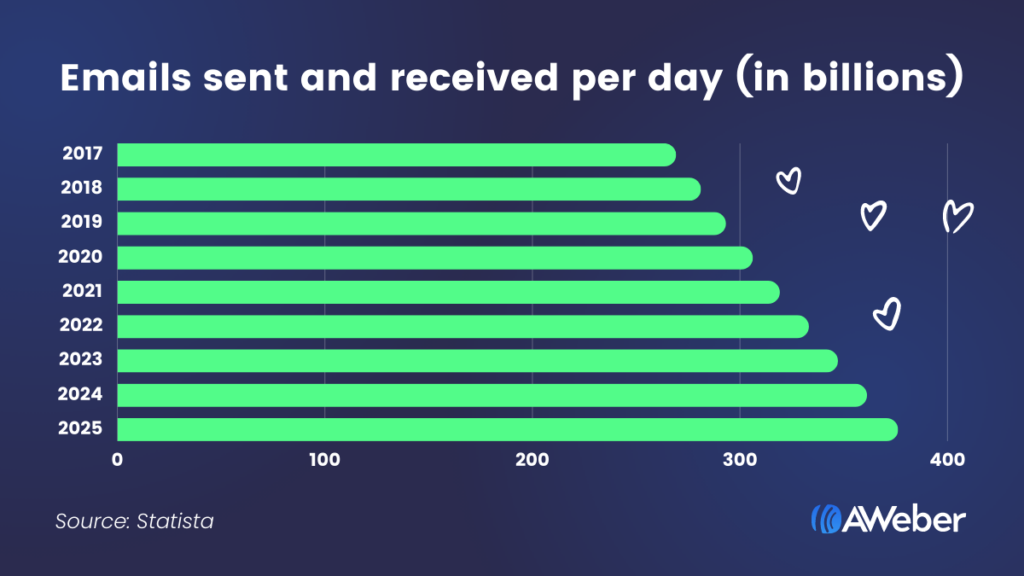
In 2022, over 333 billion emails were sent and that figure is expected to rise to a staggering 376 billion by 2025.
These days it’s not enough to assume you know what type of email your audience will want to open — let alone read through it entirely.
Creating great emails requires a lot of hard work, researching, and strategizing. The best emails are crafted not only with goals in mind, but also with the target audience at the forefront.
So how can you be sure which email will be more successful than others?
You’re not the first person to ask that question.
What if there was a way to be sure that one version of an email would generate more engagement, lead to more landing page views, and/or provoke more sign ups?
Well . . . there is – with testing.
Testing your emails is a brilliant way to determine what resonates with your audience and what sparks their interest. With email A/B testing, you can gather data-backed proof of the effectiveness of your email marketing.
In this guide to email A/B testing you’ll learn
- What is A/B testing
- Why you need to split test your emails
- Setting goals for A/B testing
- What you should test
- Email A/B test case study
- Best practices for email testing
- Setting up an A/B email test
- Tracking and measuring A/B test results
- Get started with your own email test
And by the end you’ll know how to set up a successful email split test.
But before we get started, it’s important to know what email marketing A/B split testing is.
What is A/B testing?
A/B testing, also known as split testing, is a method that lets you scientifically test the effectiveness of an experiment, in this case, an email experiment.
When split testing, you create two versions (called variants) of an email to determine which email statistically performs better. Once you find which email variant performs best, you can update your email strategy based on what you learned about the winning email.
This allows you to identify what emails engage your subscribers best, which can ultimately help you increase conversions and revenue.
Why you need to split test your emails
Split testing is an effective way to find out what’s working and what’s not in your email marketing. Rather than assuming your customers would prefer one kind of email over another, you can run a split test to find out in a methodical way.
The more you split test, the more information you’ll have on hand for your future emails. And while a once-and-done test, or even an occasional test, can yield information that will expand your marketing knowledge, regular testing can provide you with a long-term successful email marketing strategy.
Setting goals for A/B testing
Like anything in digital marketing, having a clear goal and purpose for testing is essential. Sure, you can run a quick email test and obtain useful results, but having a more precise testing strategy will yield more powerful data.
A/B testing your emails is a great tool to use at any time, but it can be especially useful if you want to gain insight on a new campaign or email format. Before you begin your test, first establish what you are testing and why.
A few questions that can help guide you at this stage include:
- Why are we testing this variable?
- What are we hoping to learn from this?
- What is the impact this variable has in relation to the performance of this email?
In theory, you could test any element of an email, but some variables will give you more insight into your subscribers’ minds than others.
The beauty of split testing is that no variable is too small to test.
What you should test
It can be tricky to identify what test can help you improve key metrics. From subject line strategies to sound design principles, there are many components that make up a successful email. Understanding each email key performance indicator (KPI) and the email components that impact those KPI’s helps identify what you should be testing.
Open rate
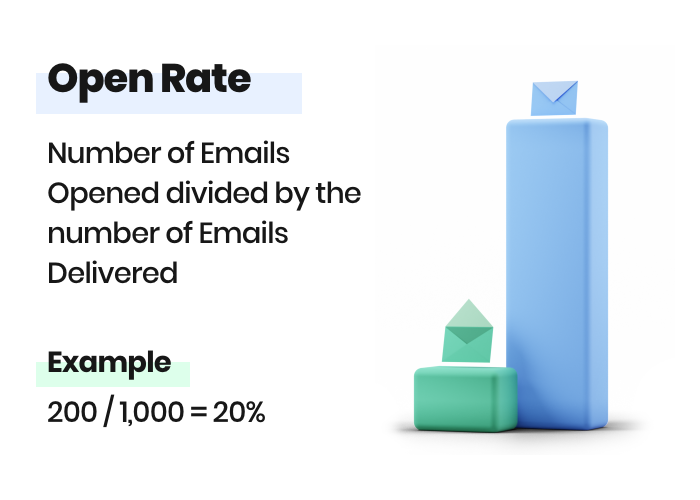
Your open rate is the percentage of customers who opened your email. It’s calculated by dividing the number of unique opens by the number of emails delivered.
If you have a low open rate you should be testing your subject line or preheader (the preview snippet of text that is next to your subject line or below it (on mobile) in your inbox).
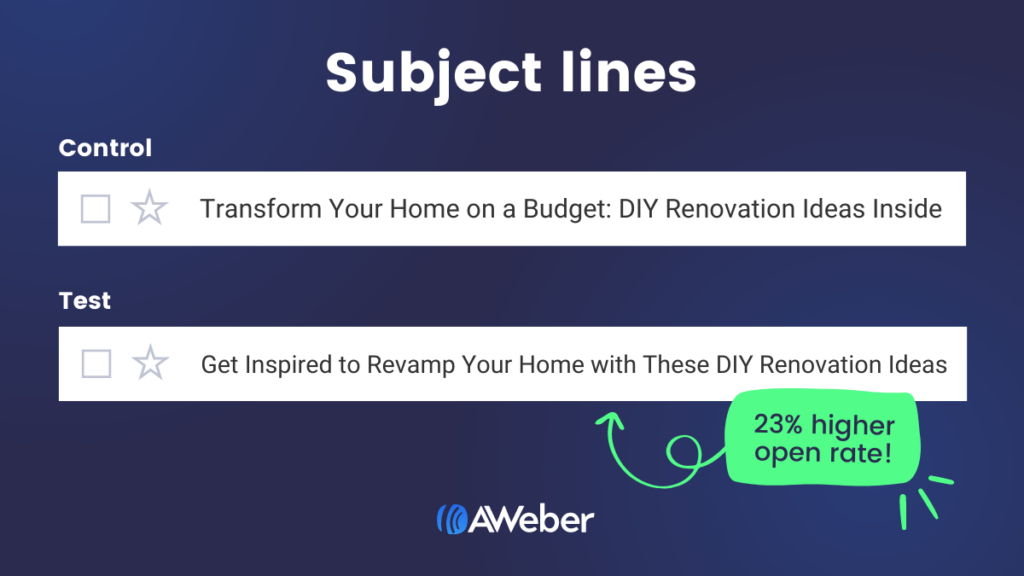
Subject lines are crucial because they’re the first things people see in their inbox. Split testing your subject lines can help make for more successful emails.
Subject line test ideas:
- Short vs long subject line
- More urgent language
- Try an emoji
- All capitalized words vs sentence case
- With and without punctuation marks
- Single word subject lines
- Statement vs question
The better your subject line, the more likely your subscribers are to open the email and read through. Having a solid subject line is like getting your foot in the door.
In addition to testing subject lines, try sending the test emails at different times of day and see if that has an impact on your open rate. Your subscribers may be more inclined to open an email in the morning or at night after dinner instead of during the middle of a workday.
Example:
Click-through to open rate
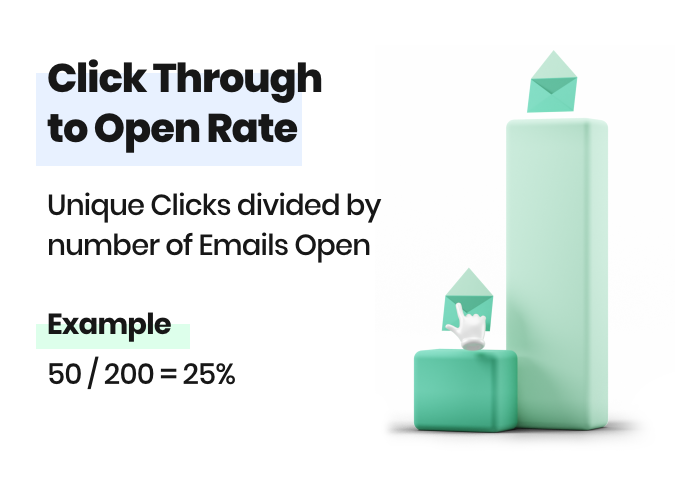
Your click through to open rate is the percentage of unique clicks in an email divided by the number of unique opens.
There are several elements within the body of your email which you need to look at if you have a low click through to open rate or if you’re looking to improve an already strong email.
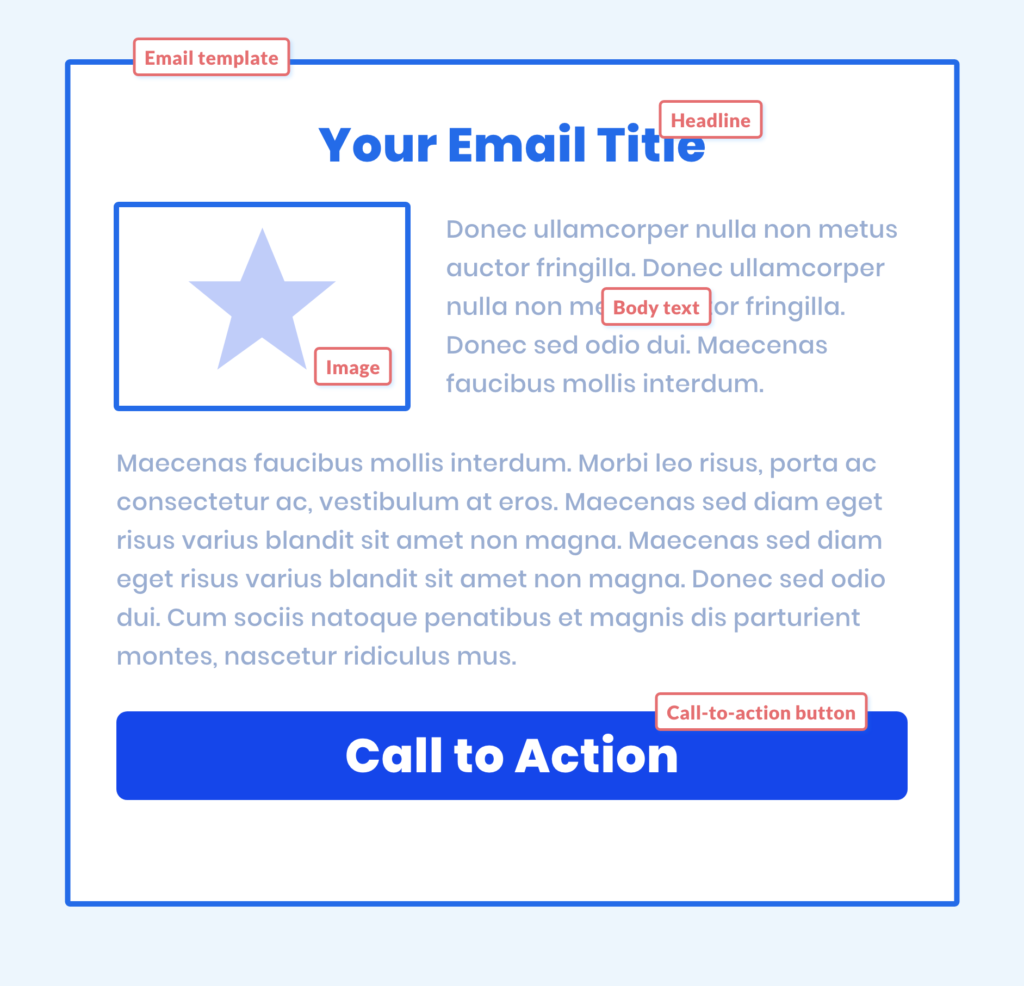
Keep subscribers interested throughout the email by providing eye-catching, engaging content. If it’s your click-through rate you want to improve, make sure you create clickable content. Consider how interactive content, information gaps (missing pieces of info that spark a reader’s curiosity), or contests could boost your in-email engagement.
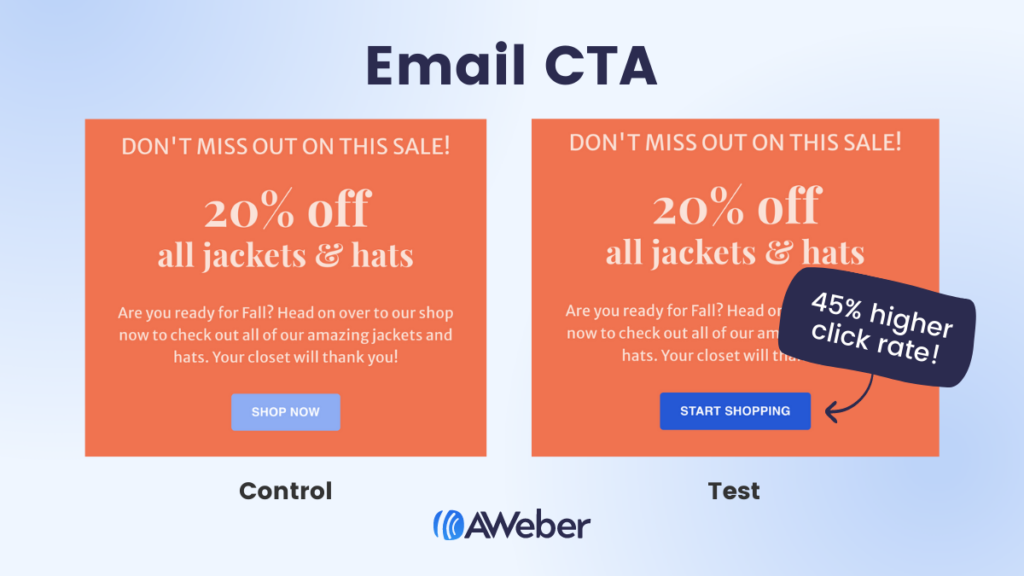
There are also many variables you can test to optimize for click-through rate — a strong call to action, intriguing anchor text, personalization, spacing, or bold imagery. Just remember to test one at a time to ensure you know precisely why subscribers are clicking more (or less).
This is why testing is so important. You can look at an email and make some assumptions as to why your performance is low. But if a change is made without testing and that theory is wrong, then you’re setting your email efforts back even further.
Email body test ideas:
- Different color call to action button
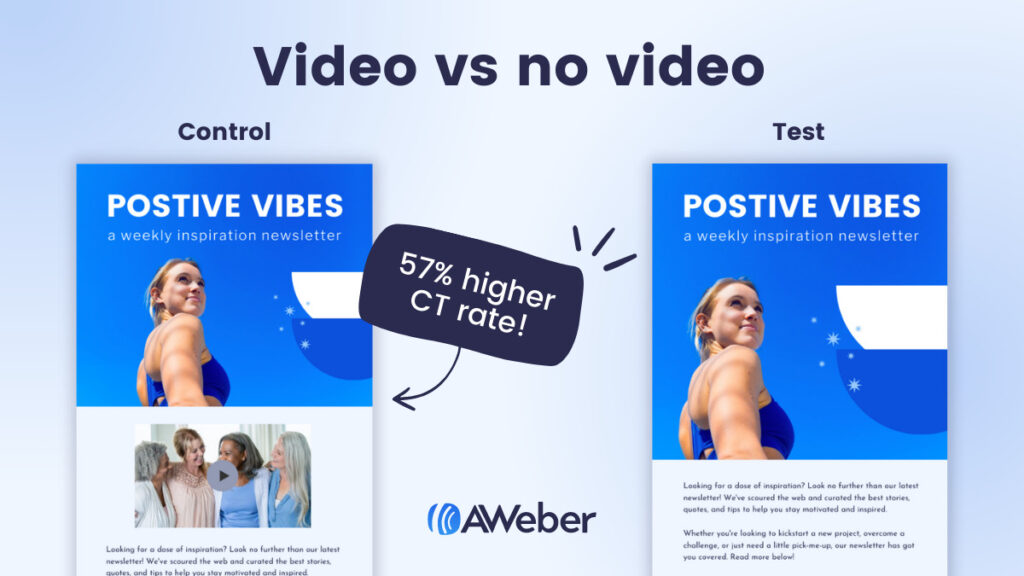
- Image vs no image
- Email message length
- Soft sell vs hard sell
- GIF vs no GIF
- Personalization vs no personalization
Design elements like colors, fonts, images, templates, and spacing are just as crucial to an email as the copy and links.
Did you know that 47% of emails are opened on mobile devices? With this in mind, think about how your email visually appeals to subscribers and what they need to get the best reading experience.
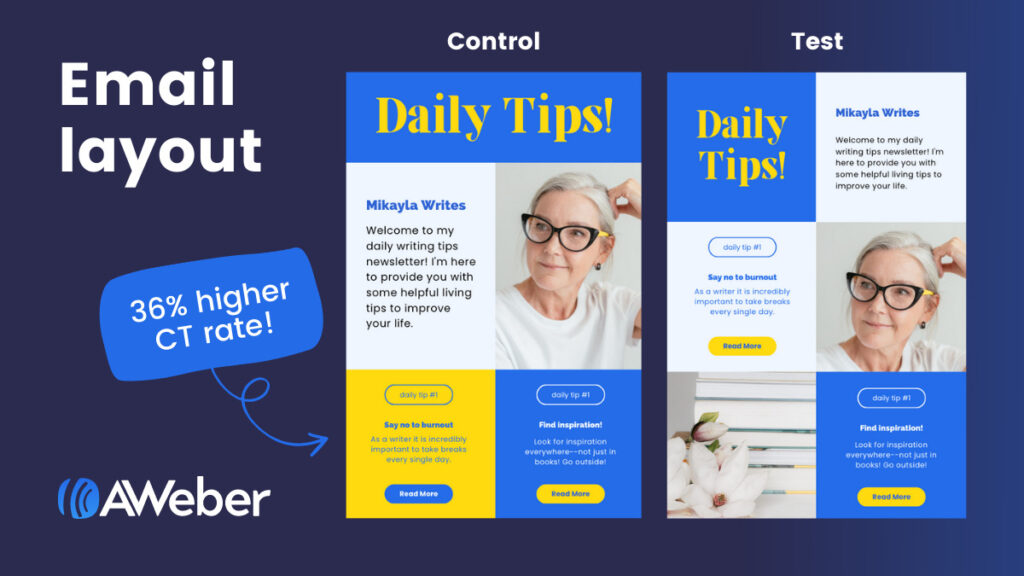
Test different templates, layouts, and formats to see which yields the best results for your email campaigns.
Examples:


Opt-out (or unsubscribe) rate
Your unsubscribe rate is the percentage of customers who opt-out of receiving future emails from you.
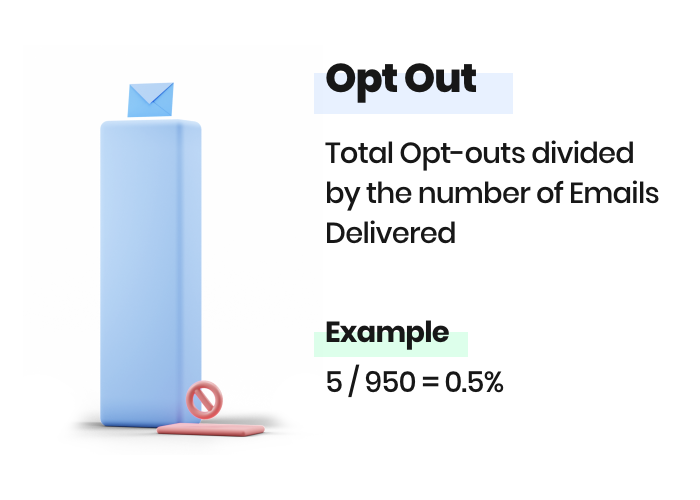
If your unsubscribe rate is high, then you may be sending too many emails or the email content isn’t relevant.
So make sure you test the frequency of emails and the relevancy as discussed above.
Email A/B test case study
AWeber customer and photo sharing community Light Stalking split their email subject lines to gauge the success of one versus the other.
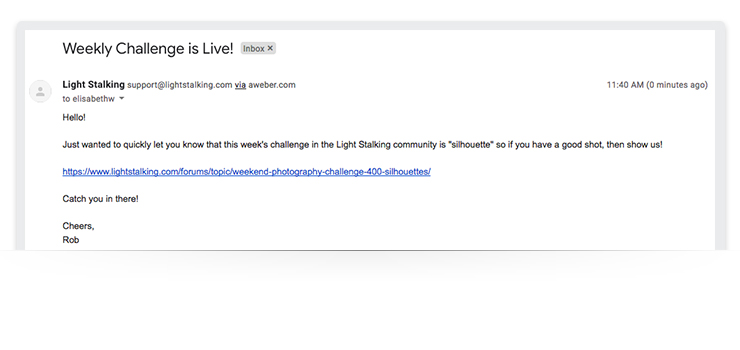
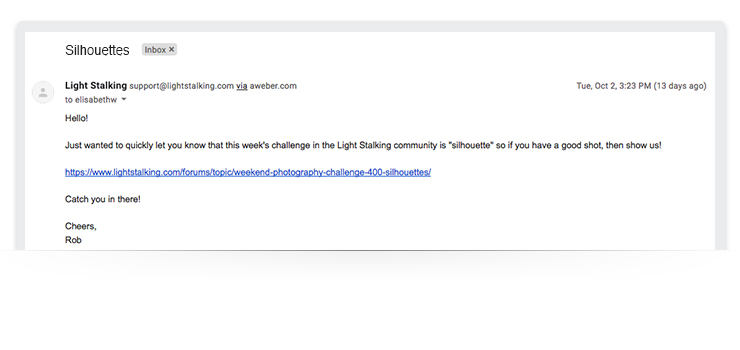
As a result, they were able to increase their web traffic from the winning subject line email by 83%.
How’d they do it?
Light Stalking wanted to run an email A/B test on the subject line of their weekly challenge email, which asked subscribers to send in a photo of a silhouette.
The test was simple: they created two identical versions of the same email, changing only the subject lines. The first email used a straightforward subject line, “The Weekly Challenge is Live!” and the second email was just one word and hinted at the nature of the challenge, “Silhouettes.”
The email with the shorter headline (“Silhouettes”) was the winner. The email yielded an above-average click-through rate, which drove more people to the Light Stalking website and increased overall engagement levels.
Impressive, right? And simple. This is a perfect example of how email A/B testing helps you make data-backed decisions.
Best practices for email testing
Email A/B testing seems pretty straightforward, right?
It is, but like any experiment, if you don’t solidify the details and ensure your test is valid, your results may turn out to be useless.
Keep these things in mind when creating your split test:
1 – Identify each variable you want to study
Prioritize your tests. Run split tests for your most important and most frequently sent emails first. And know what you want to fix about your emails before you run tests.
Create a split testing plan where you conduct one email split test a week or one email split test per month.
2 – Test one element at a time
Never test more than one change at a time. Have a control email that remains the same and a variant with one change — like a different color CTA button, or a different coupon offer — you want to test. If you have multiple variables, it’ll become difficult to identify which one caused a positive or negative result.
3 – Record the test results
Keep records of the email split tests you’ve performed, the results of those tests, and how you plan to implement your learnings. Not only will this keep you accountable for implementing changes, it will allow you to look back on what did and didn’t work.
4 – Use a large sample to get as close to statistically significant as possible
Achieving statistical significance means that your finding is reliable. The larger the sample pool for your test, the more likely you are to achieve statistically significant results. You can be more confident that your findings are true.
5 – Make sure your sample group is randomized
Tools like AWeber’s split testing make sure that your sample group is completely randomized.
Setting up an A/B email test
You have the basics of email A/B testing down, so let’s next discuss how to set one up properly.
1 – Determine your goals
First things first: Identify the intentions behind the campaign you want to test.
Your goals will act as your compass when figuring out the details of your email A/B test. Every component of your campaign should trace back to your end goals.
2 – Establish test benchmarks
Once you have defined your goals, take a look at your current email data and examine how your previous email campaigns have fared. From there, use your findings as benchmark numbers.
These numbers will be significant when it comes time to analyze your email A/B test data so you can gauge early success. These numbers should also help you decide on the variables you want to test moving forward.
3 – Build the test
You have your goals and your benchmark data; now it’s time to build your test. Remember to test only one variable at a time.
Bonus: Did you know AWeber Lite and Plus customers can automatically split test their email campaigns (and can test up to three emails at a time)?
4 – How big should your test sample size be?
You want your test list to be large enough that you can gauge how the rest of the subscribers will likely react without using the entire list, but just small enough that you can send the winning version to a large portion of your audience. The goal is to get accurate, significant results, so bigger lists typically work the best.
However, keep in mind that you should be using a sample that represents the whole list, not just a specific segment.
There are many ways to approach this. You can figure out a generic sample size with a calculation that factors in your email list confidence level, size, and confidence interval.
Or, if you’re an AWeber customer, you can manually select the percentage of your list that will receive each version of the split test.
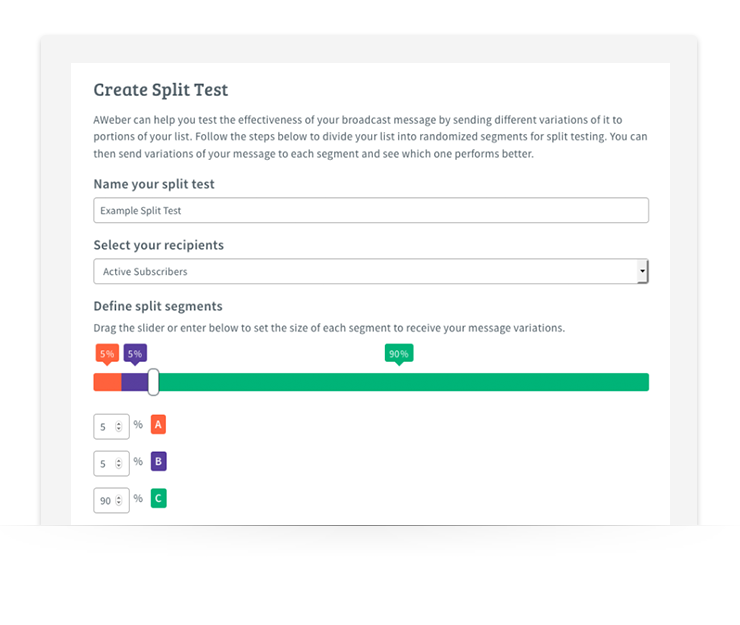
Either way, make sure you select a viable percentage of your list to send your test emails to so you have enough data to analyze. Often this is in the 10% to 20% range.
5 – How long should an email A/B test run?
The answer to this question depends on your list size. If you have a large list, then you may only need to send a single email marketing campaign. Bottom line is you want to make sure that you receive enough opens or clicks (depending on the goal of the email campaign) to ensure the results are statistically significant.
You want to make sure that your test results are at least 90% statistically significant in order to confidently conclude that your test is a winner or loser.
Run your test results through an A/B testing significance calculator to determine the percentage of confidence your test results will hold when you implement your test in future campaigns.
Once your test has ended and as you begin analyzing your data, keep detailed notes of your findings. Ask yourself:
- What metrics improved?
- What elements of the email flat-out didn’t work?
- Were there any patterns that correlated with past tests?
Maintaining records and tracking results will help guide future campaign optimizations.
Put together a testing roadmap or a detailed record of what you’ve tested, the results, and what you plan on testing in the future. That way, you’ll have a detailed account of your tests and won’t leave any stone unturned in the process.
Tracking and measuring A/B test results
With so many elements to test, you might be thinking, “How can I verify that a campaign is successful or that a test yielded helpful data?”
The answer: Think back to your goals. Your goals will tell you what metrics you should pay the most attention to and what you should work on improving – open rate, click rate, delivery rate.
For example, if generating more leads from email campaigns is your goal, you’ll want to focus on metrics like open rate, click-through rate, and form fills.
It’s also important to look at your metrics as a whole to see the big picture of how an email performed. Being able to track that data and refer back to it will also help you optimize future campaigns.
Get started with your own email test
Email A/B testing is imperative to the success and optimization of any email campaign. It allows you to gain real insight that can help you make decisions about existing and future emails.
Email marketing is always changing, and as subscribers’ attention spans seem to get shorter, it’s vital to know what will yield the most success.
The important thing to remember when it comes to creating an email A/B test is that it doesn’t have to be a complicated process. Email A/B testing is designed to deliver powerful, straightforward insights without a bunch of confusing variables.
Not sure about what font to use for the body of the email? Test it. Going back and forth between a few colors for the CTA button? Test it.
The bottom line: You can and should test different variables of your email campaign before launch so you can optimize for success. Just be sure you’re testing only one variable at a time to get the most accurate and useful results possible.
Download your free email planning template
This email marketing planning template (available in both Excel and Google Sheets) is set up so you can quickly and easily measure the performance of all your email sends and tests. Download it today.
AWeber is here to help
Already an AWeber customer? Start executing your A/B testing strategy today. Our email A/B testing tool allows you to test just about any element of your email (subject line, calls-to-action, colors, templates, preheaders, images, copy, and more!).
Not an AWeber customer yet. Then give AWeber Free a try today.


Johnathan Weberg
1/2/2019 1:05 pmWhat an awesome tool! Being able to split test pages, emails, subjects, and so on, can help you drastically increase conversion across the board, hands down.
Most companies I’ve worked with have no idea what split testing even is and once they’re introduced to it, they’re wondering why they haven’t used it before!
Good post!