Why Are My Emails Going to Spam?
By Pam Neely June 8, 2022
If you’ve put a lot of work into an email message or a newsletter, it can sting to see even one person mark it as spam.
Why would anyone do that, right? You’re a good sender. You’re not… a spammer!
But even good people can get their messages marked as spam. So let’s help your self-esteem and your email marketing metrics. We’ll walk through how even the best people can occasionally have their emails end up in the spam folder.
What is spam?
Spam is any email sent to someone who did not sign up to receive it. Spam is sometimes also called “unsolicited bulk email” or “junk email.”
Incredibly, almost half of all emails sent are spam. This means that email service providers (like Yahoo! and Gmail, for example) have a challenge: Sort through billions of emails every day and decide which emails people would actually want to see in their inboxes.
Inevitably, mistakes do happen, though the algorithms are pretty accurate. But sometimes perfectly legitimate emails get sent to the spam folder.
Here’s why your emails might get categorized that way.
1. You’re sending emails your subscribers didn’t sign up for
This can happen in several different ways.
- You’ve changed the topic or the content of your emails so much that you’re not sending what your subscribers originally signed up for.
Say you’re a vegan food blogger, and the email sign-up box on your website says, “Get weekly tips to be a better vegan chef.” Then, after you’ve been blogging for a few years, you decide you’re now all in for cheese. All you want to write about is cheese.
If you start sending emails about cheese to people who signed up for vegan cooking tips, they’re going to be unhappy. They may mark your emails as spam because they didn’t sign up for cheesy emails. They signed up for emails about vegan cooking. - You’ve added people to your email list who did not expressly sign up for your marketing emails.
Say you’re a freelance web designer, and you’ve got a bunch of past and present clients. You decide to launch an email newsletter (great!). But then you add all your past and present clients to your newsletter list.
Some of those clients — whether they like your work or not — may mark your emails as spam. It’s not personal; they just never actually expressly said “please send me your newsletter.” If you just start sending them your newsletter, they’re not going to like that.
This used to happen a lot when people would just assume all their LinkedIn contacts wouldn’t mind if they were added to an email marketing list. Bad news: People did mind. Many emails were sent to the spam folder. - Some of your subscribers don’t remember signing up for your email list.
Maybe you’ve never added anyone to a list they didn’t ask to be on. Maybe you’ve never significantly changed the topic of your emails. Maybe people just don’t remember ever signing up for your list.
This can happen, too. Especially if you haven’t mailed to your list in a really long time (a “long time” could be even a month ago). People just forget.
One way to overcome this “forgetting factor” is to include a little snippet of dynamic content in your emails that explains where or how people signed up to your list.
2. You aren’t using confirmed opt-in
“Confirmed opt-in” (also called “verified opt-in” or “double opt-in”) is basically a way to double-check that people want to be on your email list. It does require your new subscribers to click a link to confirm their address, but it’s also a way to screen out bots, people using bad email addresses, and other issues.
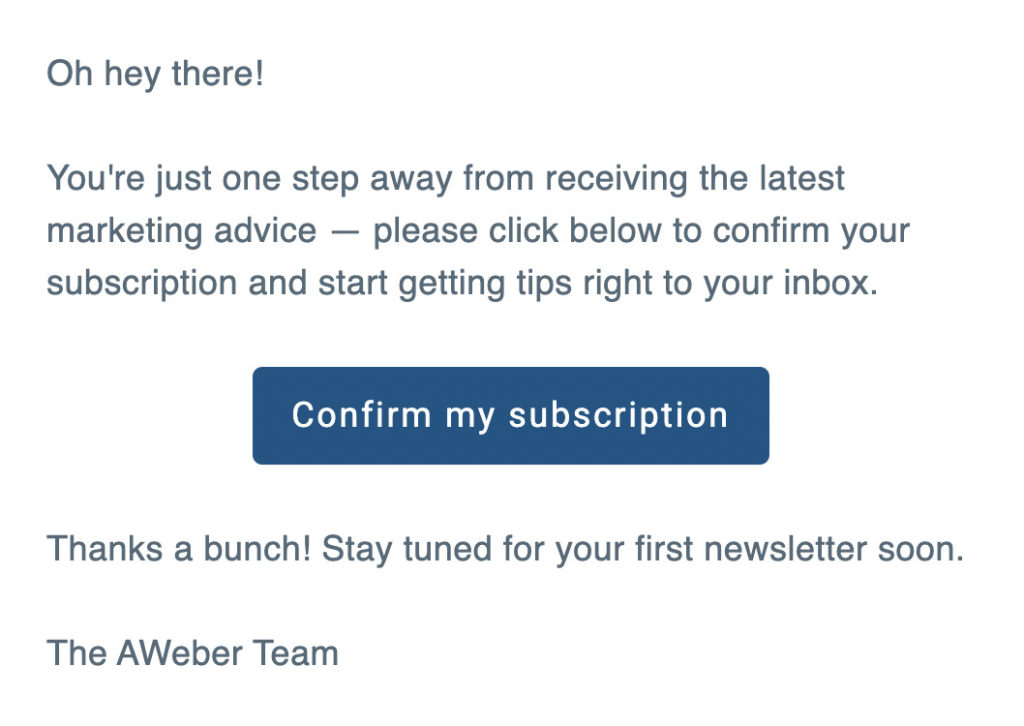
A confirmed opt-in email is a message that’s automatically sent to people who fill out your sign-up form. It asks them to confirm they want to join your list by clicking a link or button in the message.
Here’s an example of a confirmed opt-in message. The subscriber is not actually subscribed until they get this email AND click on the “confirm my subscription” button in the email.
Email service providers are more likely to deliver your emails to the inbox if you use confirmed opt-in. Using confirmed opt-in also keeps spam robots off your email list. Spam robots are automated computer programs designed to find sign-up form code on your website and submit fake information to join your list.
Using confirmed opt-in is an excellent way to maintain a “clean” list — it prevents a lot of problems before they can ever happen. So if you are having trouble with your emails going to spam folders, switching from single opt-in to confirmed opt-in could help get more of your emails into subscribers’ inboxes, rather than in their spam folders.
For more information about confirmed opt-in, see our blog post, Best Practices for Double Opt-in, or watch this video on how to avoid the spam folder. This goes into detail about confirmed opt-in, and how to set it up in an AWeber account.
3. Your emails’ sender information is missing or inaccurate
Sender information is the name, email address, and reply email address you send from.
If you want your subscribers to get your emails, it’s very important to get your sender information right. Your sender information matters to your subscribers — they want to know “who is sending this email to me?”
It also matters to email mailbox providers. They want to know “who is sending this email to this inbox? How can we verify that this is a legitimate sender?
So here’s how to make sure all the parties involved recognize and accept your emails:
- For humans: Use a consistent “from” address and name.
This includes both the email address and the from name you use in the emails you send your subscribers. Try to pick an easily recognizable from name that everyone will recognize immediately. Then stick with it.
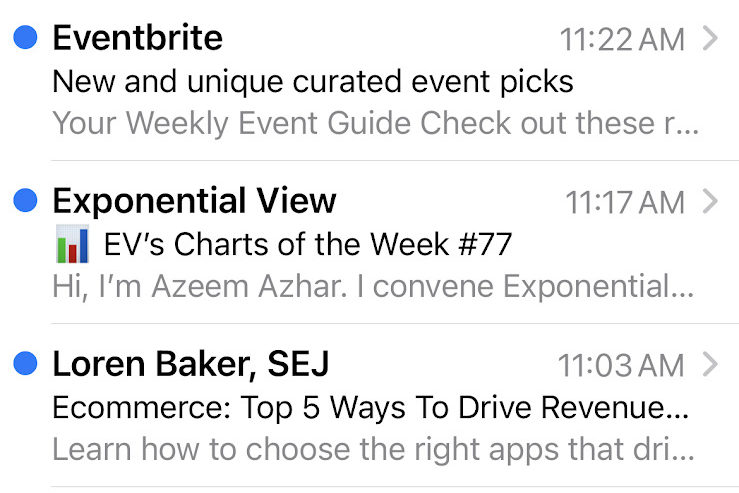
Sender names are very visible, especially in mobile view. They’re actually more prominent than subject lines, as you can see here:
- Stay consistent with the from email address you use in your emails.
Ideally, use a custom domain in your email address (so mary@marybakes.com rather than mary@gmail.com or mary45339@gmail.com). Then stick with it.
This doesn’t mean you can’t ever change your sender name or email address. Just try to do it as little as possible. - Also for humans: Make sure your sender email address is valid.
Have you ever seen an email from a company that has a little note saying “do not reply to this email,” or “replies to this email won’t be received”? Don’t do that. People should be able to reply to your emails. They can’t reply if your sender email address isn’t valid. This can be frustrating, and can lead to people just marking your emails as spam simply because you’re just giving them a poor experience.
Solution: Invite communication. Don’t stop at using a good from address; invite subscribers to give you feedback and contact you on social media. People like talking to people, not businesses. If you ever need to change your from line, make sure you let your subscribers know. - For email mailbox providers like Yahoo! and Gmail: “Authenticate” your sender information.
It’s critical for email clients to be able recognize your emails as being from a legitimate source. You can do that by:
- DKIM (DomainKey Identified Mail)
- SPF (Sender Policy Framework)
- DMARC – requires you to already be using DKIM and SPF
- Sender ID
This is especially important if you’re using a custom email address like contact@yoursite.com or susie@yoursite.com.
If you’re an AWeber customer, see our Knowledge Base article, What’s Email Authentication? How does it apply to me? That article will walk you through exactly what you need to do to authenticate your emails, step by step. Depending on which sender email address you’re using, this can be as easy as just clicking a checkbox. We’ll show you how to do it over chat, phone, or via email if you’re not sure what to do.
- Include a physical address in your emails.
The FTC’s CAN-SPAM law requires that you add a physical address to all “commercial” emails (which includes newsletters and marketing emails or email updates).
This is easy to do and is usually one of the first steps any email service provider will have you do when you set up your account.
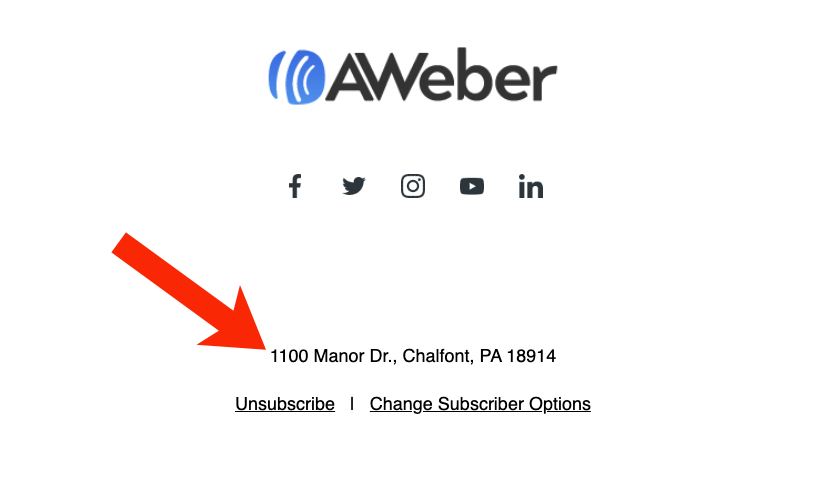
And here’s what a physical address will look like in your emails:
For more information about including a physical address in your emails, see our blog post, How to Include a Physical Address in Your Emails Without Revealing Where You Live.
4. You’re mailing to a purchased list
Never, ever buy an email list. Ever.
It might take time and it might take work, but always grow your email subscriber list yourself.
Purchased email lists, no matter who you buy them from, will always perform badly. Often, very, very badly. The people who are on these lists did not expressly ask to get your emails, and so when they get your emails, they’re going to mark them as spam.
Purchased lists might seem like a shortcut to success, but they’re actually only a detour away from success. And not only will your results be terrible, but if your email service provider finds out you’re mailing to a purchased list, they could ban you from using their service. That might sound harsh, but any reputable email marketing service has to protect its sender reputation. They cannot risk that reputation by letting their users mail to purchased lists.
5. You’re using list building tactics that don’t work well for building high-quality lists
There are many ways to build an email marketing list. Some of them are more effective than others. Some can appear to be effective (as in they get you lots of subscribers fast), but then end up not being so effective, because the subscribers you got aren’t really interested in your emails.
This can happen a lot if you’re building a list through contests or giveaways. People will say “sure — I’ll sign up for your email list,” but they’re really only signing up for the giveaway or to win the contest prize. Once they’re on your list, they may never open your emails. Or worse: They may mark your emails as spam rather than bothering to unsubscribe.
Using ads to build an email list can also create problems with disengaged subscribers.
Here’s a workaround for this: Tag new subscribers from any of your major list-building efforts. The tags can show you later on if your list building tactic generated engaged, quality subscribers, or if it just got you a bunch of people who were clicking on a great ad or who were hoping to win a contest prize.
6. You’re using misleading subject lines
It’s good to have a catchy subject line, but only use subject lines that accurately represent your emails. This includes subject line tricks like putting a “Re:” in front of the subject.
This video about how to create great email subject lines can help you write better subject lines without ever having to just cheap tricks or inaccurate statements.
Also check out these blog posts for ever more subject line inspiration:
- Should Email Subject Lines Be Capitalized?
- How to Split Test Subject Lines Like a Newsletter with 2.5 Million Subscribers
- Get Higher Open Rates with 22 of the Best Email Subject Lines
7. You’re hiding the unsubscribe link
If subscribers can’t find the unsubscribe link, they may just mark the message as spam to save time.
According to CAN-SPAM law, all commercial emails are required to have an unsubscribe link. But some less-than-reputable senders have devised ways to hide or obscure unsubscribe links.
To make sure your unsubscribe links are easy to find:
- Make sure the linked text says “unsubscribe.”
- Don’t make it hard or impossible to read the unsubscribe link by changing the link’s text color or changing it to have a tiny font size.
- Use a “one-click” unsubscribe link. Making people log into an account or go through lots of steps to unsubscribe is frustrating. No one has the time. If you make it hard for people to unsubscribe, they may just mark your emails as spam because that’s the fastest way to stop the emails.
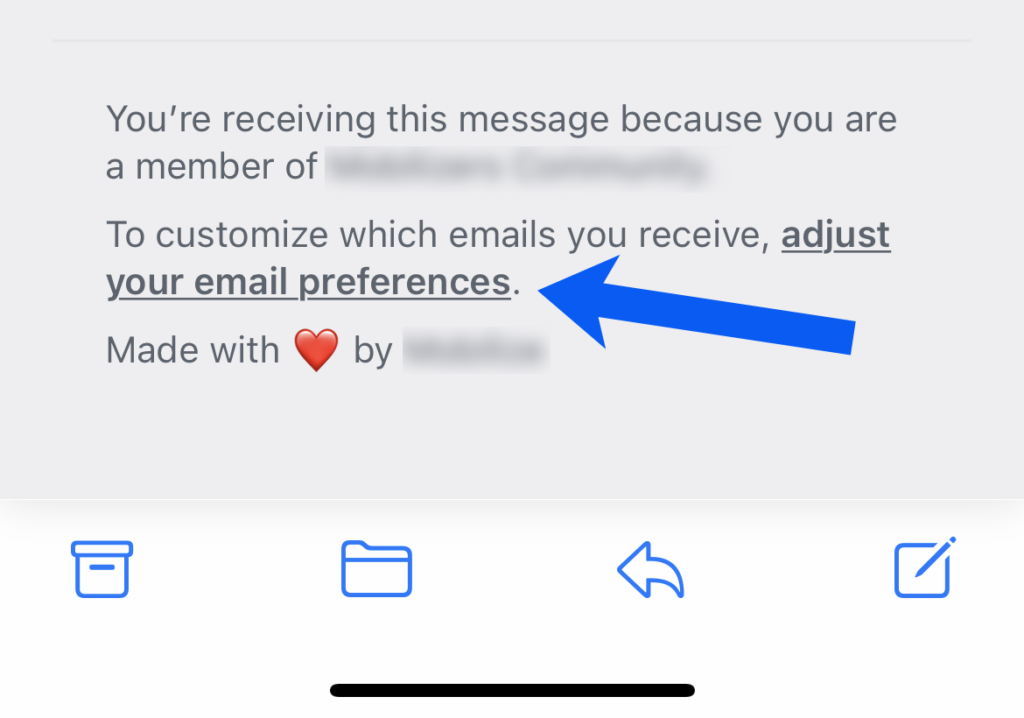
Here’s an example of an unsubscribe link that requires people to log in and “adjust your email preferences.” Don’t do this. Just let people unsubscribe instantly.
8. You’re not maintaining your list as well as you could be
This is a less serious mistake than other things we’ve mentioned earlier, but if you haven’t removed inactive subscribers from your email list for a while, that could cause more of your emails to be sent to spam.
“Inactive subscribers” would be any subscriber that hasn’t opened an email from you in a certain amount of time — say within the last six months. Some email senders feel six months is too short a timeframe, so you can use twelve months, but we recommend six months.
If you use AWeber, you can find and then remove inactive subscribers easily. Or you can call, text, or email us and we’ll do it for you.
If you don’t want to delete all of your unengaged subscribers right off the bat, try sending a re-engagement series to get their attention. However, don’t try to reengage your unengaged subscribers forever. At some point, just let them go (they aren’t making you money anyway).
9. You’re using link shorteners or linking to unreputable domains in your emails
The algorithms that decide whether emails will go to the spam folder or to the inbox are quite sophisticated. And the companies that use those algorithms don’t like to share every aspect of how their algorithms work — they don’t want to give spammers any clues.
But one of the things we do know about how spam algorithms work is that the links in your emails matter. A lot. More than most senders realize.
On a scale of 1-10, with ten being “absolutely do not ever do it” and one being a “meh — try to avoid it,” using link shorteners is a 7 according to AWeber CEO Tom Kulzer. He explains, “There’s almost never a good reason for including link trackers in an email… particularly when sending from an email service provider. Your ESP is already tracking clicks for you, so there’s no reason to layer more tracking on top of it from yet another domain that impacts your reputation.”
Tom says another bad link practice to avoid is using “naked” links like “https://www.example.com.” His advice: Embed the link instead.
“Since sending the visible https://www.example.com/ is going to end up getting rewritten to a tracking link and then the visible text and the linked text don’t go to the same place, mailbox providers can frequently flag those messages as phishing emails or higher risk.”
Want to know more about link shorteners and other things that can cause email messages to be sent to the spam folder? Listen to this podcast interview with Tom on the Hustle & Flowchart Podcast.
How to keep your emails out of the spam folder
Congratulations – you now know quite a lot about email spam. You’ve got enough information to keep your emails out of the spam folder and hopefully out of Gmail’s promotions tab, too.
Now it’s up to you to apply this knowledge to your list. Given all the things we’ve covered here, what are you most likely to implement? Leave a comment and tell us what you plan to do.


