Affiliate Marketing: How to Make Money as an AWeber Advocate
So you want to make money with affiliate marketing, but you’re not sure where to start? Let’s take a closer look at what it means to be an affiliate and how you can make money with affiliate marketing.
What is Affiliate Marketing?
In a very basic sense, affiliate marketing is receiving a commission from a business for “bringing in” a customer, who then makes a purchase. Once that customer has purchased, you are paid a percentage of the sale.
How to make money as as affiliate marketer
Making money as an affiliate marketer is easy. Just start promoting the product or service on your website, in your blog, social media channels, within YouTube videos, in your emails, or through word-of-mouth recommendations. You may even be able to do some paid advertising.
Our best tip? Treat your affiliate marketing like a business, and think about what you would do to best promote this business?
Now let’s discuss the fun part. How can you start making money with affiliate marketing?
Each affiliate program is different but most usually follow one of two different commission models. Some programs will pay you a one-time commission at the time of the sale. This can be a predetermined flat amount or a percentage of the sale price. Others, like subscription-based services, will pay a recurring commission for a set time period.
How to start affiliate marketing
Getting started with your affiliate marketing programs can be done quickly and easily. The key is to find the right products and services to recommend to your unique audience.
Once you sign up with a company to be an affiliate, you will receive a unique affiliate link that you will include when promoting the product or service.
When someone clicks on your affiliate link and makes a purchase, the sale is credited to you. Then you’ll receive a commission. You can participate in however many affiliate programs you like, but be sure to read the terms and conditions of each as programs tend to differ.
Affiliate marketing 101
Your role as an affiliate is to find solutions that help your specific audience solve a problem. It’s much easier to take this approach then to find an audience for a specific product or service. But how do you know what your audience wants?
Think about what interests your audience. What pain points do they have? How would this product help make their lives easier or better? Remember: consumers buy a product because they believe it will help them be a better version of themselves.
You’ll also want to think about the products, tools, and services you already use and love. Your audience will be much more likely to try out your recommendations if you can share your own personal experiences with them. They will view you as the authority and they’ll want to know that you’ve tested it out previously.
Does AWeber have an affiliate program?
AWeber has an Advocate Program. It’s essentially the same thing as an affiliate program, in that you can make money showing small business owners and content creators how to use AWeber.
Email marketing can be a powerful income stream for you. And AWeber’s Advocate Program is a great option, whether you are a beginner or already successful in affiliate marketing.
AWeber advocate details
Here’s what you need to know about becoming an AWeber advocate:
- You will receive recurring referral payments up to 50% for the lifetime of an account after they’ve signed up for AWeber Pro.
- There is no cost to sign up.
- Payments are sent digitally via PayPal.
- You receive dedicated advocate management.
- AWeber offers tons of valuable training and resources to help you earn more revenue.
Sign up For AWeber’s Advocate Marketing Program
Your role with AWeber is to refer customers to our service, who then purchase an AWeber customer account. When a payment is made on that customer’s account, you get a referral payment from AWeber. Once you sign up, we’ll create your unique ID and advocate link so that you can start earning a lifetime of recurring money by promoting AWeber’s marketing services.
If you haven’t done so yet, set up your free advocate membership.
You will receive a referral payment from the same account every time that customer pays us. So if an advocate is making steady payments to AWeber, you receive a referral payment for every payment they make.
A customer may sign up for our AWeber Free program, and if that same person upgrades to our AWeber Lite or Plus plans, you will then start receiving a referral payment on that advocate.
How to Use Your AWeber Advocate URL
Right off the bat, let’s sign in to your AWeber advocate account, using the advocate ID and password we have sent to your email address.
Your screen will look like this:
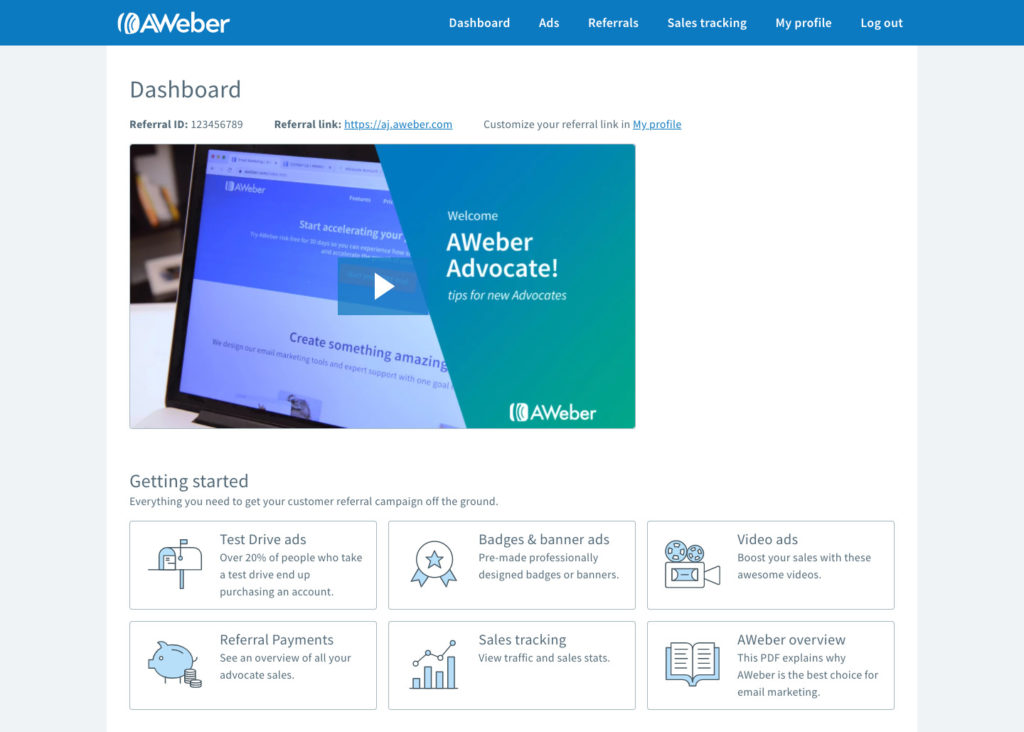
At the top left side of your screen you will see your Affiliate ID number.
This is your unique affiliate ID number assigned to you by AWeber.
Now, look to the right and you will see Referral Link.
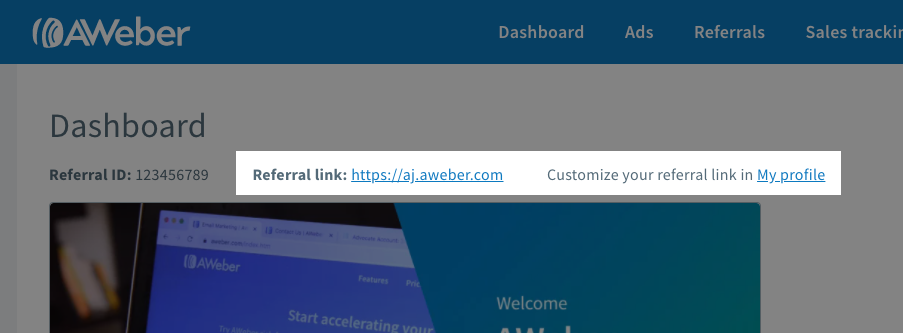
When you join our Advocate Program, we’ll provide you with an ID and a unique referral link. Your affiliate link is your “lifeline” to AWeber. We use it to directly track your advocate sales. When someone clicks on that link and is taken to AWeber, we know that it is you who referred them.
Your advocate URL can be placed anywhere you can write text or HTML. Some places you may want to put it include:
- Your Email Signature
- In the text of your website or blog
- In chat or email message
- Behind a clickable image on your website
- In a YouTube video
The possibilities of where you can place your AWeber affiliate URL are limited only by your imagination.
Ready to earn more revenue as an AWeber Advocate?
If you love AWeber and want to get started earning affiliate revenue, then our AWeber Advocate program is a great place to start. Click the button below to sign up for a free advocate account, and start earning revenue when your referrals become an AWeber Lite or Plus customer.


