25 Free or Cheap Ways to Build an Email List from Scratch
By Kelsey Johnson April 26, 2022
Rather watch or listen?
Building an engaged audience is one of the best marketing strategies around. And email is one of the most effective channels.
But what’s the best way to get started? How do you grow an email list without an existing audience to market to?
If you’re starting from scratch — or are looking to boost your list growth — we’ve got a slew of list building ideas for you. Read on for 25 free or budget-friendly ways to grow your list, even if you don’t already have followers somewhere else.
Note: Ideas that require payment will have a U.S. dollar sign ($) next to them.
Jump ahead to your favorite list growth idea:
- Optimize website signups
- Website chatbots
- Use your Newsletter Hub
- Have a sign up form at your store/location
- Facebook groups
- Facebook lead ads $
- TikTok
- Shared Instagram live
- YouTube
- Medium
- Hire an influencer $
- Podcast commercials $
- Appear as a guest on podcasts
- Appear as a guest on a webinar
- Host a webinar with a well-known guest (and promote to their audience)
- Guest post on similar websites
- Promote a special freebie to another audience via email
- Support local events $
- SlideShare
- Quora
- Claim your local listings
Capture the audience you do have
1. Optimize website signups
Whether you’re building an email list from scratch or you already have a sizable list, always be looking for the best way to get as many web visitors to sign up as possible.
The best way to do that? Test!
Test your sign up form’s location.
There are tons of places on your website you can add sign up forms:
- Navigation bar
- Footer
- A homepage section
- A specific sign up page
- Blog sidebar or footer
- Popups anywhere on the site
- And many more
Start by adding one to your homepage, since that’s the page most people will see. Then, continue to test forms in other places to see if there’s a “sweet spot” for email signups.
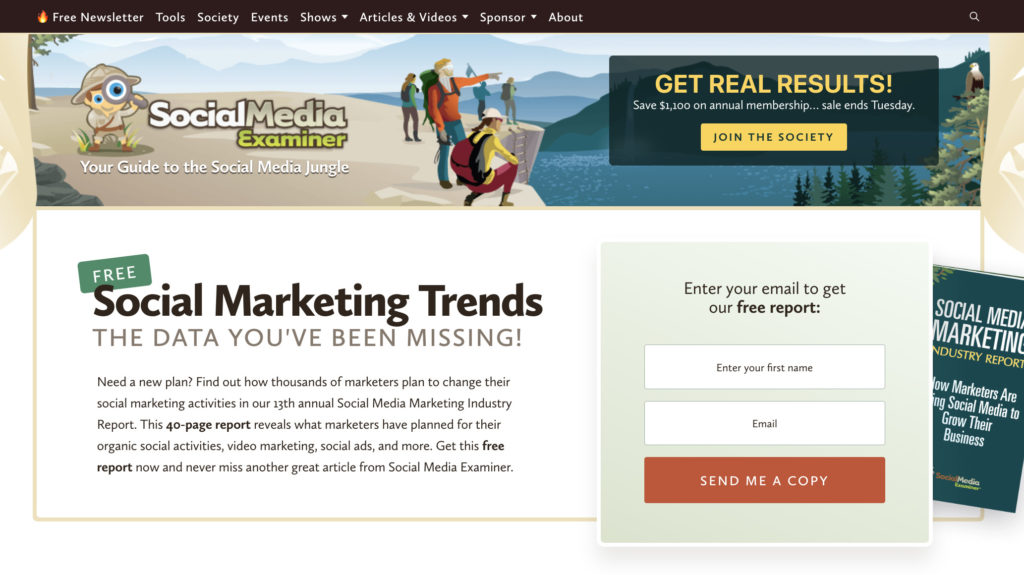
Social Media Examiner may cover all things social media, but the top section of their homepage is all about getting people to sign up for their email list.
Test what your form says.
The way you entice people to sign up for your email list matters. But every audience is different — there’s no secret sauce. You just have to test what works for your customers.
Here are a couple of things to try:
- Add a testimonial
- Write your form in the same style as your newsletter
- Include your name and headshot
- Write a funny call to action
- Make a security and privacy promise
Here are 16 more sign up form ideas to grow your email list.
2. Website chatbots and contact forms
Chat widgets are becoming more and more common on marketing websites — even for small businesses. The chat will pop up in the bottom right corner of your site and offer answers to frequently asked questions.
Plus, chats usually ask for a name and email address! (See where I’m going with this?)
A lot of these chat widgets are staffed by live agents, but you can actually get free ones that are fully answered by AI — aka a chatbot.
Add a chatbot to your website for free, using a tool like Collect.chat. To do this, you simply need to create a chatbot for your site, connect it to your email marketing tool, and you’ll start to regularly grow your email list simply from the traffic on your website.
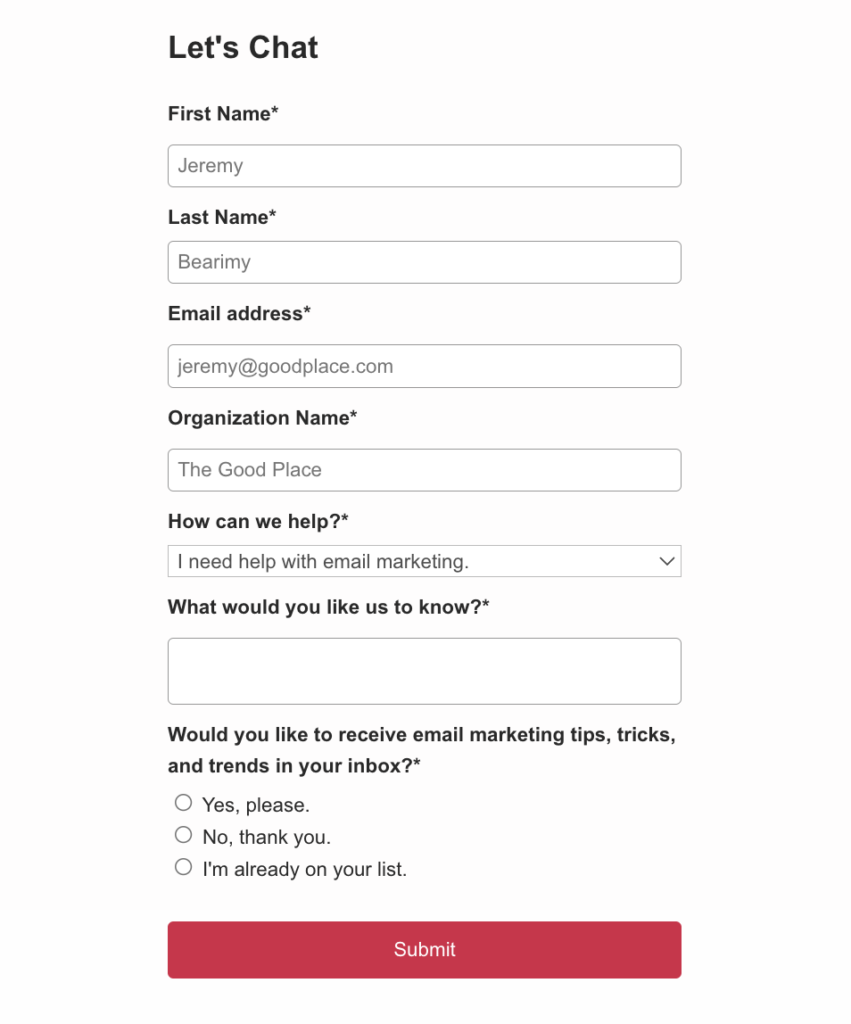
Contact forms are also a great way to build an email list from scratch. The sign up form below is from the contact form on Emily McQuire’s website, Flourish + Grit.
3. Use your newsletter hub
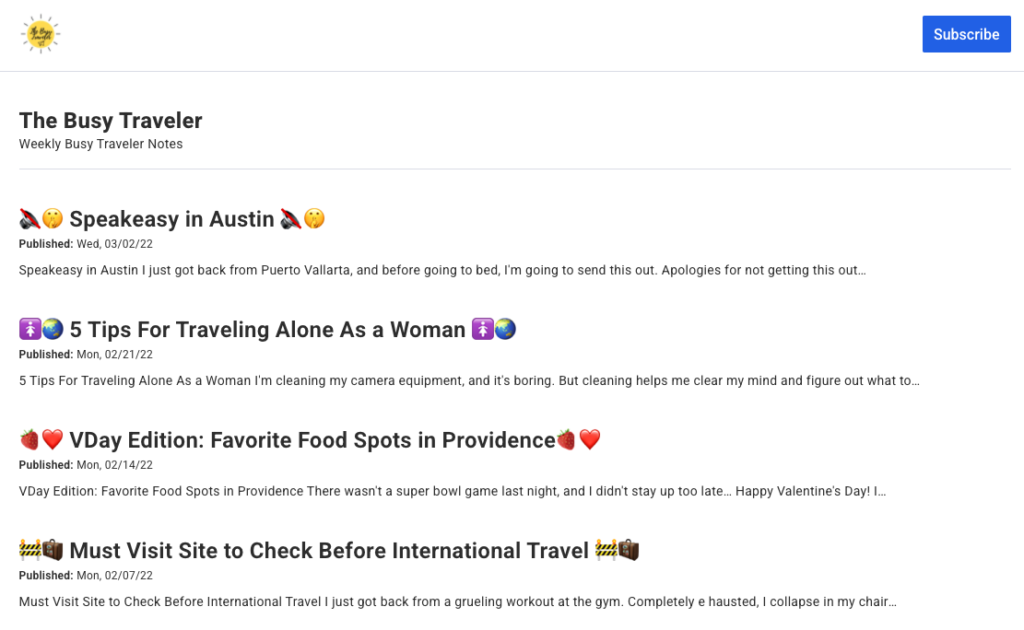
Even if you don’t have an audience yet, you can still send broadcasts and they’ll show up on your newsletter hub.
You know the phrase “fake it until you make it”? Your newsletter hub will make it seem like you already have an established newsletter with a large list. And yes — that will entice more people to sign up.
Build out your newsletter hub and share it in your social media platforms, in ads, or anywhere else you’re promoting your email list.
Here’s an example of an enticing newsletter hub from a travel blogger:
4. Have a sign up form at your store/location
You may have integrated your store’s system with your email marketing tool. But are you collecting emails from shoppers who haven’t made a purchase yet?
Make sure anyone who stops by your store or physical location can easily sign up to get your emails (which will include news and updates about your store).
Do you regularly release new products? Offer seasonal sales? Talk about what’s going on in your community? These are all topics that may be interesting to your foot traffic.
Enable them to sign up for your list via an iPad — or even a physical signup form that you can add to your email list later. This is one of the best and most common ways to build a list from scratch. Just make it as easy as possible for people to sign up. Also consider offering a small incentive, like $5 off their first purchase, to entice more sign ups.
Social Media
5. Facebook groups
Groups is one of the most popular features of Facebook. And it’s a fantastic way to identify niche interests.
People come together for niche interests in Facebook groups. There are groups for interests ranging from digital marketing for lawyers to cosmetology. Since everyone around the world has access to Facebook, every specialized topic exists there.
So find yours.
Identifying your target audience. Do some searches in Facebook for groups who might be interested in your products or newsletter.
The key here is to start slowly and build rapport before pitching your content. So jump in and start engaging, asking and answering questions, and building relationships. Prove yourself to be a subject matter expert, but also engage as a participant.
After a few weeks or months, when someone asks a question related to your newsletter’s content, you can mention your emails. Better yet, link to the related content on your newsletter hub.
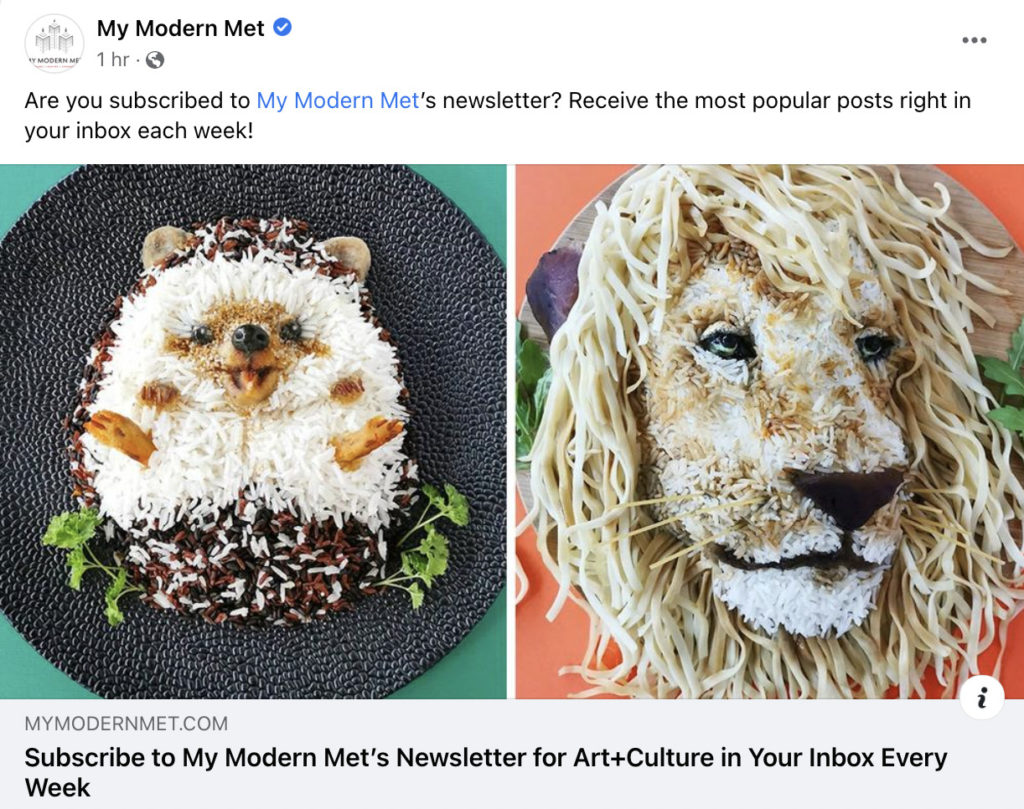
Check out how arts and humanities company My Modern Met encourages people to check out their newsletter:
You can unlock a huge potential to grow your email list in a Facebook group relevant to your niche, but you will also find quick skepticism. As with all unpaid opportunities, you must provide continued value over time.
Related: How to Build (and Grow) Your Email List with Facebook
6. Facebook Lead Ads $
If you’re just getting started with your list, chances are you have a low budget. Luckily, Facebook Lead Ads are actually one of the most affordable ways to grow your list.
It’s pretty easy for anyone to get a Facebook Lead Ad set up — no marketing or tech expertise required. And you can start growing your list and learning more about your audience by spending $5 or $10 a week.
The best way to get started with Facebook lead ads is not to overthink it. Get something simple out there at an affordable price and spend a few minutes each week making adjustments to what you say or your images. Eventually, you’ll learn what works to bring in lots of subscribers.
Get step-by-step instructions on how to get set up from this instructional video on YouTube:
7. TikTok
TikTok is no longer just a “kid’s” social media platform. It is projected to reach ¾ million monthly users in 2022. Over half of TikTok users are 30+ years old.
The TikTok algorithm has been particularly popular with business owners because it’s so good at finding and creating groups with similar interests quickly.
TikTok is 100% video, so to build an audience you need to get comfortable with video quickly. But the good news is that the audience standards are relatively low on TikTok. Your video doesn’t have to be polished or perfectly edited — just interesting, heart-wrenching, or funny.
To get started building an audience on TikTok start by downloading the app on your phone and engaging with it. Watch other videos and use the discover feature to find your community and keep up on trends.
Then, start making videos! Your best friends in creating good TikTok content will be a ring light and editing software. I recommend a $25 Amazon ring light and the Splice editing app.
Make sure you include a link in your bio to allow people to sign up for your email list. In fact, you can get even more subscribers with a freebee lead magnet.
8. Instagram
Just over 1 billion people use Instagram for an average of 53 minutes a day. That’s a LOT of people you could reach to grow your audience.
Instagram is similar to TikTok — you need to be creating videos to reach your audience. So if you decide to create videos on TikTok, simply share them to your Instagram account under the Reels feature.
But pay attention to the way other people are creating their videos on Instagram and copy what works. Look for popular sounds and trends. And it’s not only a video platform — you can upload pictures too.
Instagram followers can be very engaged: Once you’ve started to grow your Instagram followers, make sure you encourage them to sign up for your email list.
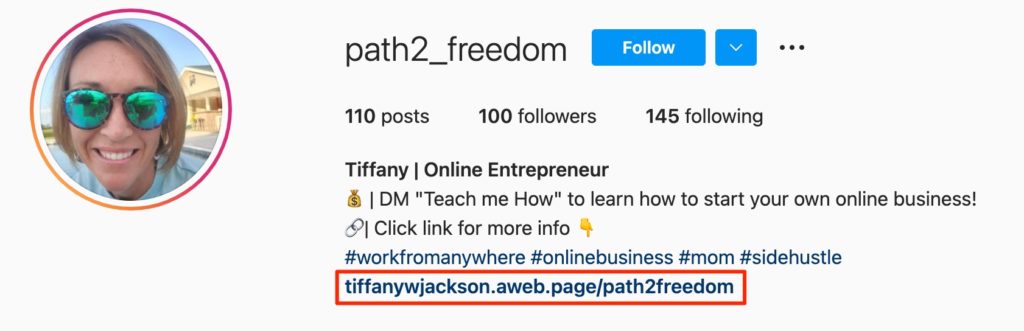
- Put a link in your bio to sign up for your list
- Post regular reminders on your stories to encourage signups
- Incentivize your followers with a lead magnet
See how AWeber customer Tiffany promotes her signup page in her Instagram bio:
9. Shared Instagram live
10% of all brands use live video sessions on Instagram to promote their products or services. But 90% percent of the top brands do regular live sessions. If you want to grow your list and sales, Instagram lives (live streams on your Instagram account) are clearly an effective tactic.
If you start an Instagram live by yourself you can reach your audience. But, if you start an Instagram live WITH another account you have the opportunity to get your business in front of their followers too.
To get followers and email subscribers from shared Instagram lives, you need to make sure you have a plan. Promote to all followers in advance, plan out something really interesting to do, be open to answering questions live, and, if possible, do Instagram lives on a regular basis (weekly on Sundays, for example).
While it can be exciting to get more Instagram followers, use this time to pitch your lead magnet instead. It’s far more valuable to get new subscribers to your email list than new Insta-followers. You can always promote your Instagram account later, via email.
10. Twitter
There are a lot of professionals who spend time on Twitter and no other platforms — you may want to consider it as a tool to grow your email list.
For example, there are tons of marketers, developers, and journalists on Twitter. Get a Twitter account and do a quick search for topics in your niche. If there are real people (not bots or business accounts) engaging with each other in your business’s area of interest — get involved.
Twitter is largely a text-based platform. Be ready to contribute your professional opinion and expertise regularly and intricately.
Luckily, if you’re planning on sending a newsletter, you likely already have the content you need. Explore putting what you plan for your newsletter into a Twitter thread. You can even get direct feedback and use it to guide your content.
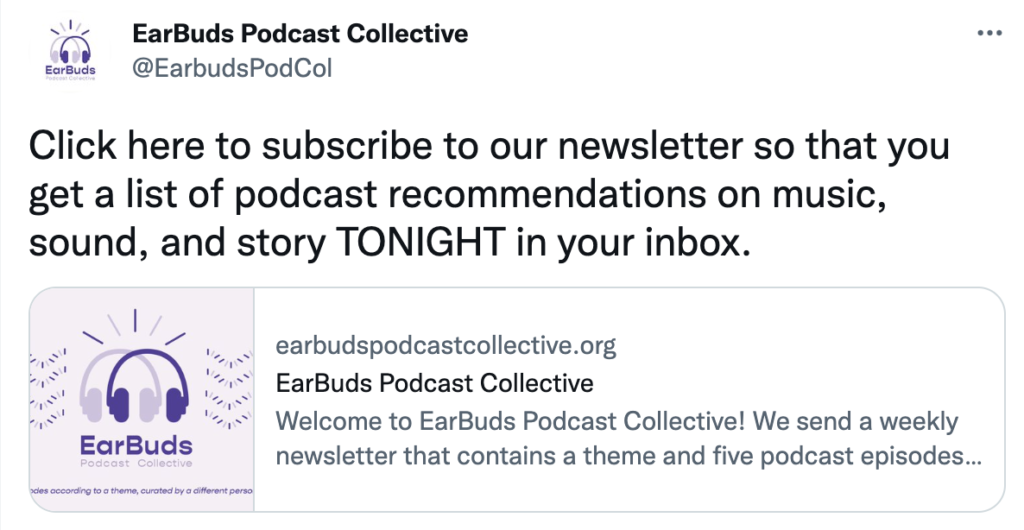
Don’t forget to point people to sign up for your newsletter, and include a link to it in your profile.
See how Earbuds Podcast Collective promotes their newsletter in this to-the-point Tweet:
11. YouTube
With 122 million active daily users, YouTube could be a huge opportunity for finding your audience. Everyone from children to people living in nursing homes knows how to use YouTube — so your audience is likely there.
If you don’t already have a presence on YouTube, start making videos discussing the topic you’re an expert on — giving away advice related to what you can offer your audience. For example, a painter could give painting instructions or talk about what types of paint are best for certain situations.
Because you’re already asking people to subscribe to your channel in your videos, it can be difficult to ask people to subscribe to your list too.
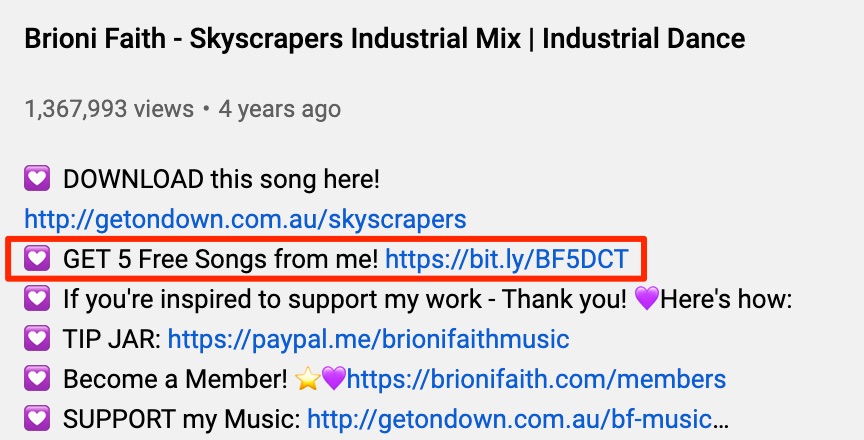
So, create a compelling lead magnet and link to it everywhere: in your video descriptions, channel header, and About tab.
The best way to grow your YouTube channel and your email list with YouTube is to reply to comments — on your videos and others’. Get involved with your community and watch as it grows.
Don’t forget YouTube Shorts, which are very similar to TikTok: Short videos with a smartphone vertical layout. These can be a good discovery method for your YouTube channel too.
Artist and music producer Brioni Faith includes her lead magnet / email sign up form in several places on her YouTube channel:
12. Pinterest
Pinterest is largely a visual medium, so pay attention to it if your business offers something visually appealing.
Historically, Pinterest was used for things like wedding and outfit inspirations. But now it’s also used to inspire website design, interesting graphics, and even business templates.
So take a few snapshots of your best designs. Or, better yet, use Canva to create beautiful checklists and processes related to your business and add them into Pinterest.
Make sure you link to your email list in your bio.
13. Medium
Medium is a public blogging and publishing site with over 60 million active users. So, instead of publishing a blog post on your website and hope it ranks on search engines, you can publish it on Medium and it will be more discoverable.
Show your expertise: The key to success on Medium is having new things to say about your industry or area of experience. And writing quality is important.
If you are a writer with things to say, you can build your reputation for thought leadership, your email list, and your new leads and customers.
Simply set up a Medium account, add a signup link to your bio, and start writing.
14. LinkedIn
LinkedIn can be an undervalued and underutilized list-building tool. Because you can see peoples’ actual titles on LinkedIn, your list-building work can be highly targeted. Remember, list quality beats quantity. Highly-targeted, super-engaged lists of even 400 or 500 people can drive tens of thousands of dollars in your business.
To use LinkedIn to build a list from scratch, start by reaching out to everyone as a person, not a business. So make sure your personal profile is fully set up. Connect with the people you already know personally and professionally.
Then start searching for people with similar titles to your target audience. Are you a freelance writer? Search for content marketing managers. Do you offer services to financial planners? Search for them.
Connect with people and write a personalized offer for them to sign up for your list. Make sure you let them know what they’ll get from your emails and offer to give something back — maybe you can sign up for their email newsletter too.
If you find active LinkedIn groups in your searches, sign up for those too. Use the same strategy as Facebook groups — offer a lot of content up front, then as opportunities arise you can offer people to sign up for your list to get more information.
Tapping into other audiences
15. Hire an influencer $
Don’t have your own audience? No problem — pay someone who does.
Influencer marketing has gotten a reputation for being expensive, but it doesn’t have to be.
You pay influencers depending on their audience size, so the key is to find an influencer with a small audience that is exactly the audience you want to target.
With a small budget, it’s best to reach out to these influencers directly. Send them a direct message and be very thoughtful, flattering, and kind. Pitch what you’d like from them up front and be transparent about what you can afford.
Make sure the influencer links to a page where their audience can sign up for your lead magnet, and you’ll be growing your audience in no time.
16. Podcast commercials $
Podcasts have extremely captive audiences. Podcasters are speaking directly into the ears of their listeners. And, in order for a podcast to be remotely successful, it needs a specific audience and topic.
So search around on Apple Podcasts or Spotify for something in your niche.
The key here is to find less well known podcasts, which may have smaller audiences, but advertising will be extremely affordable. Plus, you’ll get your name — and newsletter — in front of the exact audience you’re looking to reach.
17. Appear as a guest on podcasts
Have expertise but no budget? Try offering to be a guest on a podcast instead.
You can drive awareness to both your experience in your field, and encourage people to sign up for your newsletter.
If you’re nervous speaking in public or don’t have any expertise to pull from when pitching yourself to podcasters, try making one or two YouTube videos first.
18. Appear as a guest on a webinar
Like podcasts, webinars allow you to get in front of a targeted audience. And they are generally only attended by your best prospective customers — people who want to spend an hour of their precious time listening to what you have to say.
Start to put your name out there: Find larger companies offering webinars to their audiences and pitch a topic to them via email.
Tip: You can look extra professional by sending a bio page made with AWeber’s landing page builder.
19. Host a webinar with a well-known guest (and promote to their audience)
Have you had success being a guest presenter on another webinar? Why not try hosting your own. Webinars are one of the best ways you can build your email list.
The problem is, you don’t have much of an audience to promote it to yet. But, if you can find someone who is popular and well established in their industry, you could promote your webinar to their audience instead.
You can also promote the webinar via targeted Facebook ads to people who likely already know and want to hear from your expert.
20. Guest post on similar websites
Your audience is getting information somewhere — and it may be another website with similar topics (but not necessarily a competitor’s site).
Reach out to companies with similar audiences to yours and offer to write a blog post their audience would like.
At the end of the post — once you’ve proven yourself to be a trusted expert — let readers know they can find out more by subscribing to your newsletter. Or, better yet, offer your lead magnet at the end of your blog post.
21. Promote a special freebie to another audience via email
You know that company that you wrote a guest post for?
Offer a specialized freebie or promotion just to their audience. The most effective way to do this is by having them send it to their email list. If you put it on social media, anyone could see it. But an email is private.
Plus, people on their list are already interested in receiving emails about topics and products similar to yours. They will be a great audience for your list, too.
22. Support local events $
Advertising often seems like a prohibitively expensive way to grow your business. But there are levels to all advertising that may be closer to your achievable budget.
Find events in your town, neighborhood, or surrounding area that align with your values, business offerings, or ideal customer profile. You could have a booth at a local festival, give back to a church / nonprofit, or sponsor a local lunch-and-learn.
To find more information about your business, you can share your list signup landing page. Or, better yet, throw your landing page on a tablet or smartphone and get new subscribers signed up on the spot.
There’s still no better way to promote a small business than in-person, locally.
Public listings
23. SlideShare
Got slides from your recent webinar? You can use them to build an email list from scratch via SlideShare.
SlideShare is a free tool that allows you to share your slide deck publicly. And it’s touted as a largely educational resource.
So, upload those slides you’ve been working on, make sure they include plenty of CTAs to sign up for your list, and click publish. It’s an extremely simple way to make more use out of content you’ve already created. Not to mention grow your list.
24. Quora
We’ve all gone to Quora to have our questions answered. But have you ever thought about becoming a question answerer on Quora?
You should: 35% of Americans use Quora (imagine the opportunity to reach ⅓ of the U.S. market).
By answering questions on Quora, you can demonstrate your knowledge on topics related to your business. Plus, you are allowed to link to useful resources — like a landing page with more information on the topic you answered. Then make sure you add a lead magnet with a sign up form at the bottom of the page.
25. Claim your local listings
If you have a business storefront or physical address, chances are you already have started to accrue “local SEO” listings.
These listings can be found on Google My Business, Apple Maps, Yelp, TripAdvisor, Facebook, NextDoor, and in a variety of other places.
Search for your business on each of these sites, claim your listing, and make sure you link to a page where people can sign up for your email list.
Small tasks like this can feel insignificant when trying to build an email list from scratch, but you’ll find over time that the more places you make your signup form available, the more subscribers you’ll get.
What worked to build your email list?
Did you try out any of these tactics to build an email list from scratch? Was there an aha moment when something clicked for you? Let us know in comments. Or submit a request to be featured in one of our success stories.
If you need an email marketing tool to manage your sign up forms, landing pages, lead magnet delivery, and subscribers — plus, of course, to send emails — try AWeber today.


