Do You Make These Mistakes In Your Email Footer?
Posted by Justin PremickIt’s been a while since we’ve picked apart an email campaign.
I’m not really a fan of being negative, but a great example of what not to do came across my desk the other day, and I can’t help but share it with you.
Please don’t make the same mistakes with your email footer that these guys did.
The Offending Email
Ethan, one of our web developers here at AWeber, was puzzled at an email he recently received from a ticket sales website. He had absolutely no idea who this company was. He couldn’t remember ever doing business with them.
He eventually figured out (after going to their site and trying a login/password combination he rarely used) that he had purchased tickets to an event through them — over a year ago.
As we often remind people looking to collect subscribers offline, permission isn’t indefinite - it expires, and if you email subscribers out of the blue after a long time, they lodge spam complaints because they don’t remember you.
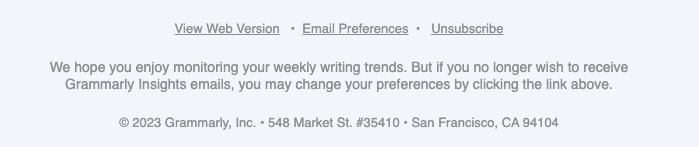
That’s not what caught my attention about this email, though. What I found especially appalling was their email footer:
Three things about it made my slap my forehead:
1. Vague Opt-In Reminder
Remember: this company hasn’t emailed Ethan at all since he made his purchase a year ago. So they should have known he wouldn’t expect an email from them.
While they did at least attempt to put a permission reminder in this footer, they failed to actually remind him of anything.
Their reminder text:
Our mailing list records indicate that your email address is opted-in to receive this email.
Great. Very helpful. “Oh, they say I’m opted-in. Well, I must be.” Right?
When you create a permission reminder, especially if you don’t email often, make sure you tell people:
- Where and/or how they signed up
- When they signed up
You could also put the subscriber’s email address in the footer (as this company did), although I would say that’s less important than where, how and when they signed up (after all, they already know what email address you’re emailing them at, right?).
A much better permission reminder:
This email was sent to (email address) because on (date), (first name) signed up for ticket alerts at (website URL).
Now, at least the subscriber can check out the web page where s/he signed up and hopefully recall signing up there a few months (a year?) ago.
Want to create a permission reminder like that in AWeber?
2. No Replies Allowed
Nothing says “you’re just a number to us, buddy” than an email campaign that tells you not to bother replying.
Yes, there’s a link to their Help Desk in the footer. But what about people who don’t read down to the footer?
Is it really so hard to send from an address whose inbox forwards directly to the Help Desk?
One of the advantages of email marketing over other mediums is that it lends itself to having a two-way conversation with your customers and prospects — why would you shut out subscriber interaction and feedback like that?
3. Difficult To Unsubscribe
To top it all off, in this example unsubscribing is a real challenge.
The company forces you to login to your account with them to unsubscribe:
People who want to stop receiving email from you are going to do it, one way or another. If you make it hard on them, if you put hurdles in the way of them opting out, they’ll simply mark your messages as spam.
Not only does the company in this example lose a chance to learn why people unsubscribe from their list, they put themselves at risk of blocking and filtering due to complaints.
Lessons Learned
- Remind people why they’re getting your email. Be specific.
- Be available. Avoid using “noreply” or unmonitored addresses in your “from” line.
- Make it easy to unsubscribe.
What Do You Think Should Go In An Email Footer?
Do you do these things in your email footer? Can you think of other items that should go there?
Share your ideas below!
Print This Post
33 Responses
-
Andrew Kordek
February 21st, 2008 at 4:48 pm
Wow…could it have been any worse. I agree to not focus on the negative, but this was a pretty harsh way to send an email in terms of wanting to establish a nurturing relationship. I call this a "drive by" email. Ya never knew it was coming and when it got there, there was some loss of life. Thanks for the post.
-
Shirley
February 22nd, 2008 at 12:26 am
My newsletter makes unsubscribing easy and clear to the reader. However, I did not know that the customization you describe is available through AWeber.
I’m referring to the permission reminder shown in the box ("This email was sent to…")
If I add this type of permission to my current newsletter, will it automatically and properly fill in the blanks, or will the reminder only show the subscription date and Web site URL to new subscribers?
-
Scott Young
February 22nd, 2008 at 10:09 am
Thanks for the reminder. Yes - that was pretty brutal! I’m also impressed with some of these "hidden" features that this has. Keep these coming!
-
Justin Premick
February 22nd, 2008 at 10:42 am
Andrew,
That’s a good name for it… "drive by email…"
For me, it’s like the difference between the paperboy who puts the paper on your doorstep and the one who chucks it toward your door (and into a puddle) as he whizzes by.
One cares about what you do with what he’s bringing you, the other does his job with little to no effort/interest in what happens after his job (sending) is done.
Shirley,
The site URL and subscription date will be accurate for any subscribers (including older ones) who are signing up to your list through a signup form you’ve created in AWeber and put on your site.
-
Flora Morris Brown, Ph.D.
February 22nd, 2008 at 11:17 am
Wow! This is a great feature. I’m going to implement this detailed reminder right away.
Must it be placed in the footer? I like to tell folks right away near the top that they signed up.
-
Justin Premick
February 22nd, 2008 at 11:31 am
Flora,
You can place the permission reminder anywhere you like.
For our own email campaigns I put the reminder in the footer but I’ve seen many companies put it at the top (and some have even put it in in both places!).
You might consider running a split test to see if putting the reminder at the top of your message vs. in the footer has any effect on opens/clicks.
-
Flora Morris Brown, Ph.D.
February 22nd, 2008 at 11:45 am
Justin,
Thanks for another idea. I’ve never done a split test, but this is a good time to try it.
BTW, is the signature file also the footer you refer to. I couldn’t find an area called "footer." Do I need another cup of coffee to find it?
Thanks
-
MaryAnn
February 22nd, 2008 at 1:21 pm
Actually, I put "Do you want your own subscription" note way up on top, with a link to the subscription form. I’ve got the unsubscribe link at the bottom. That combination seems to work pretty well.
-
Justin Premick
February 22nd, 2008 at 1:40 pm
Flora,
"Footer" just refers to the end of your email.
There’s not a specific page in AWeber to enter your entire footer, you’d put your footer at the end of your emails. The signature box you refer to determines what appears if you enter the {!signature} variable in your emails.
-
Samantha Hartley
February 22nd, 2008 at 3:08 pm
Nothing annoys me more than emails that take more than two clicks to unsubscribe from. Since I send out an ezine myself, I know not to use the "report spam" button to unsubscribe. However, it sometimes feels like they’re putting obstacles in the path of unsubscribers, and that’s uncool.
I love the idea of using a permission reminder and will implement it immediately!
Thanks for the great ideas.
-
David Canham
February 22nd, 2008 at 4:35 pm
This is how I start every email
============================================
You are receiving this email as you are a Confirmed
and Valued subscriber to my mailing list.
Your IP: {!add_ip}
Date You Subscribed:{!signdate ss}
Using Name:{!name_fix}
Using Email Address: {!email}
============================================
This email is ONLY Sent To Verified Subscribers.
I hate SPAM as much as you do!
============================================Hi {!firstname},
-
Dan Simpson
February 23rd, 2008 at 9:42 am
That is all great information - but I am a little confused. If someone on your list is not yet opted in then they cannot receive emails through Aweber. So how do we remind them to opt in through aweber and benefit from the personalization fields to acheive the goal.
-
Roger Haeske
February 23rd, 2008 at 1:59 pm
Good article though I think your missing a big point in one area.
The unreliability of email. I’ve gone to a helpdesk system precisely because I’ve had some customers try to get in contact with me via email and never to have that email reach me.
With my helpdesk, they get the email reminder and if they don’t they can still look up the response at the helpdesk. It’s simply a more reliable way of communication. It’s not dependent on email only.
With all of the spam filters out there, email even non commercial email sometimes gets filtered and therefore lost. Do you know how annoyed a customer becomes after he emails you three times about a problem with an order and hears no reply?
-
Rob Toth
February 23rd, 2008 at 8:39 pm
Oh, this I liked:
>> if you put hurdles in the way of them opting out, they’ll simply mark your messages as spam.
I hate to be that guy (I really do), but I ALWAYS hit spam and/or block the address if I’m tired of getting their mailings and they force me to login and "change account settings". ALWAYS.
Let me qualify the above though and say that the only ones I want to stop receiving messages from are the ones I likely never wanted an "account" for in the first place… they are the membership optin pages (vs. an actual service provider where I indeed created an account).
Am I wrong in doing this? Probably. But the last thing I want to do is visit a page, dig up login info, login, find the profile section and then unsubscribe and confirm my unsubscription. Maybe it’s preferred mode for the company, but who’s in charge of my Inbox? Me! So they should focus instead on what’s more convenient for me.
-
Justin Premick
February 24th, 2008 at 10:23 pm
Dan,
Footers like this are typically seen more often in emails sent to already active subscribers; however, you can personalize your confirmation message with names, dates, subscribe IPs/URLs, just like you can other subsequent emails.
Roger,
Helpdesk software can definitely be useful. We use an internally developed helpdesk software to manage incoming support requests as well as emails sent to our help address.
In my view, the key is to provide as many ways for customers/prospects to get the answers they need as possible. That’s why we provide phone and text chat support as well as a way to contact support via email or a ticket created online. It’s been quite successful for us; you might find that such an approach works for you, too.
Rob,
Well said - subscribers are indeed in charge of their inboxes, and failing to recognize that fact and plan your campaigns with it in mind will inevitably cause delivery issues.
Permission-based email marketing is exactly that - permission-based. Ultimately, our subscribers make the rules, because the rest of us (email marketing firms, ISPs, businesses) all rely on their patronage to prosper.
-
richard cary
February 25th, 2008 at 3:09 am
some of the best i have read in a long time,i was turned in as spam once, from a voice mail i was trying to help. it was very hard on me to accept it,my own sister who sends emails- to me,ends up in the not verified mail.and here i am trying to run a business,that means getting leads that are verified,so many dont have a varified email account.
so we press on and do the best we can, so much to learn along the way.there is a cost, when we dont finish what we have started, it will follow us again and again. failure after failure, untill we learn to finish what we have started.
-
Frank Haywood
February 25th, 2008 at 2:05 pm
I’d just finished writing tomorrow’s blog posts when I stumbled across this while coming to set up a broadcast message to let my blog subscribers know.
The comments about non-deliverability of email and the need to use help desk software is precisely what I’ll be covering in one of tomorrow’s posts.
I sell business tools to businesses and the bulk of my subscribers are small businesses like my own.
The reason I’m moving to my own internally developed help desk software is precisely because of the problems detailed above.
Up until today I’ve been doing all my support via email. Big mistake I know, but it seemed like the right thing to do for quite a while.
Over the last 3 months I’ve seen a huge rise in the incidence of either bounced emails, or customers writing "Second Request:" emails because they’ve not received my reply. In 99% of the cases it’s because they’ve either used free or their ISP email addresses rather than a business email address off their own domain.
I suppose they’ve only got themselves to blame.
So tomorrow I’m starting a campaign to re-educate my customers on the importance of using business email addresses rather than free ones. And I urge any business owner reading this to do the same.
(I’m just an inch away from banning all the major free email domains. We’ll see how things go with my help desk.)
If you’re running a business, it’s NOT ALRIGHT to use a free or ISP email address.
What do you think the chances are of a business email going from a free email account to an ISP email account and back again?
I’d say nowadays about 1% or less.
SOMETHING in a business email is going to trigger a spam filter somewhere.
Nowadays having a free or ISP email address is the equivalent of having a phone that only intermittently receives calls, and only works to make calls when it feels like it.
This is why tomorrow I move to a help desk for all my support. I know it will upset some people, but if that’s the only way I can prove that I’ve answered customer support issues pronto, then that’s what I’m going to have to do.
Please feel free to read and comment on my blog posts about it on the 26th Feb.
-
Shirley George Frazier
February 25th, 2008 at 7:45 pm
It seems that the permission reminder can only be added in the HTML newsletter version, not the HTML and text version.
Am I correct?
-
Corrado Coia
February 25th, 2008 at 10:52 pm
Every so often I would get a complaint on a weekly-ish newsletter sent out to my list which I provide entirely free fishing tips and videos, with no strings attached.
The mailing list is verified opt-in with the option to opt-out visible right in each email, and I accept and respond to replies. I also send one follow-up email to new subscribers providing them with a free ebook and telling them what they should expect.
I’ve been puzzled at why after taking all the proper steps that I still (every so often) receive a complaint on something like "Here’s a Free Fishing Video for You!".
Though after reading this entry I think that my problem might be that I do not remind people why they are getting my emails. It is very easy for someone to forget why/when/where they do stuff, especially when they are flying all over the internet.
So I will add that reminder to each email’s footer and see how that goes. Maybe it’s also needed as a header.
Thanks for the continuing great advice.
-
Justin Premick
February 27th, 2008 at 11:24 am
Frank,
Helpdesk software can be useful, no doubt about it.
I definitely agree that business owners should use an email address at their domain to send email.
However, I don’t see the usefulness of forcing people to use them to contact you or subscribe to your list. Seems to me you run the risk of unnecessarily offending people who either don’t have a business or domain yet, or prefer not to disclose it at the time they contact you.
Personally, I have a handful of addresses at domains/ISPs. While many of those addresses end up in the same inbox, I’m not always comfortable giving out my domain email address. So I use one of my other ones.
Over time, I may decide to use the domain-based one to contact that company/site/person or subscribe to their list. But if you were to try to force me to subscribe with a certain type of address, instead of the one I was comfortable talking to you with, I’d just go elsewhere.
That’s my $.02, anyway. Hope it helps.
Shirley,
You can add permission reminders to text emails as well as HTML ones.
Those reminders are simply a line or two of text (often personalized) that tells people why they’re receiving your email. Is there something about them that makes you think you can’t put them in plain text emails?
Corrado,
Forgetting why they signed up (or that they did at all) is one reason that people might mark your email as spam. A permission reminder can help with that.
You’ll also want to look at how often you email them, and whether you do so using a "From" name/email address that they recognize and associate with your website.
-
Marty Foley
March 1st, 2008 at 7:09 am
I appreciate your tip #2 about "No Replies Allowed."
I must confess I’ve been testing this in some of my
followup series by including an email address in the
From line which starts with "noreply@"The email address IS valid and checked regularly,
though. My intentions were good because I wasn’t
blocking all access but wanted to minimize the risk
of emails getting lost due to filters and was
including a link to my online contact form as an
alternate contact option.However, I didn’t think of those who don’t read to
the end of the email so as to find the contact link.
I’ll be changing this based on your tip.
Marty Foley
-
Stephen Spry
March 4th, 2008 at 4:27 pm
That email footer IS a shocker isn’t it!
As far as the no reply-to address is concerned… why not direct that to your help-desk software, such that support@yourdomain plugs into the help desk and automatically generates a ticket? Including a direct link to the support desk as well, and you should pretty much have that issue covered.
I also ensure that the subject line in each email identifies my service - so instead of saying:
"Here’s A Free Video Stephen…"
the subject line will be
"[NMTB] Here’s a free video Stephen…"where the [NMTB] identifies me/my site and reminds the subscriber who I am - also makes my emails easier to see hiding in their inbox.
I’ve also KILLED the Uppercase Beginnings On Every Word in the subject - a sure sign it’s an ad!
Speaking of ads… how many people actually identify "commercial" emails as required to under various legislation? Answer… not many!
-
Shirley George Frazier
March 5th, 2008 at 8:44 am
Hi Justin,
To answer your question,
"Is there something about them that makes you think you can’t put them in plain text emails?"
I thought that {!addurl} or similar text would show in the footer versus the actual translation.
Thanks for the update.
-
Andy
March 6th, 2008 at 10:36 am
I like these posts. It’s like going to the water cooler and tossing ideas around of what works and what doesn’t. It’s a definite push forward on training of the AWeber system.
A question earlier didn’t get an answer and I have the same inquiry: How do you push another email out to the unverified? I’ve got a close-knit group signed up and know most of them well enough to call up. So I just want to say "You’ve got the first step handled, now open the Verify email and click the pretty link. :)"
Any way to do that?
Thanks for your help. -
Justin Premick
March 6th, 2008 at 11:34 am
Hi Andy,
Subscribers can request another copy of the confirm email (if, for example, they happened to delete it) by resubmitting their address in your signup form.
However, aside from them requesting another copy of that email, it can’t be resent.
For more on why this is, take a look at this blog post and discussion.
-
Peter
March 6th, 2008 at 12:34 pm
I just put a variation of the "reminder" in my signature (in Global Fields) but the variables are not getting replaced with the subscriber data.
I sent in a ticket.
-
Jodi
April 8th, 2008 at 12:30 pm
One more thing I noticed (or maybe it’s in a different part of the email?) is that there’s no physical address in the footer. There should be one to comply with CAN-SPAM rules.
-
Lyn Smith
April 12th, 2008 at 6:47 am
I find it very annoying when websites make it difficult to unsubscibe to their mailing list
-
Learn From a Great Email Newsletter Example: Kayak - Email Marketing Tips on the AWeber Blog
May 23rd, 2008 at 2:05 pm
[...] ripping apart some poor email examples, I think it’s high time we point out someone who’s doing an email newsletter [...]
-
Leslie
May 31st, 2008 at 9:49 am
What a GREAT article!
And some EXCELLENT comments, to boot.
I took David’s sample from above (THANK YOU for sharing that with us!), adjusted it slightly and saved it in a text document on my desktop so I can easily cut and paste it into each new autoresponder message as I go.
Here’s my slightly modified version:
=============================
———- *** Friendly Reminder *** ———
=============================Thank you for being a valued member of the
Absolutely Essential Guitar mailing list!You are receiving this email because you
signed up for and confirmed your request
for information. Your details are as follows:Date you subscribed:
{!signdate ss}Name submitted:
{!name_fix}Email Address submitted:
{!email}Your IP address at that time:
{!add_ip}============================
This email is ONLY sent to people who have
requested info and confirmed that request.
Seriously, I hate spam as much as you do!
============================I could, of course, make it more generic and put it in my sig, but I thought it important to include the name of the actual website the person signed up from to serve as a very clear reminder to them.
If, however, I ran just one website, I would do both. That is, put the name of my business in the "template" above and then include it in the sig.
Anyway, thanks again to David. And, indeed, to Aweber for posting these articles in the first place, and to all the folks who take the time to share their advice.
Nice one!
-
Leslie
May 31st, 2008 at 10:54 am
Ha ha! Too funny!
I just ran that through the SpamAssassin and it gave me a 0.4 spam rating! The reason:
"Body contains a lame excuse as to why spam was sent"
LOL!
It highlighted the phrase "You are receiving this email because"
So…
I removed that entire paragraph and got a zero rating.
My little message now reads:
==================================
———- *** Friendly Reminder *** ———
==================================Thank you for being a valued member of the
[name of your site/business] mailing list!Date you subscribed: {!signdate long}
…
…
…etcetera
As you can see, I also altered the date variable to the long version to avoid any confusion with dates like 1/6/2008 — Is that the 6th of January or the 1st of June? Depends where you’re from, dunnit.
I also removed the line-break on each piece of data.
And finally, I’m not crazy about the "Friendly Reminder" title, which I just whacked in without thinking too hard about it.
Now that I have had time to consider it, it doesn’t QUITE sit right with me. It kind of has that "looking-over-the-bifocals", pursed-lips, school ma’am tone about it that I’m not a big fan off, y’know…
Any ideas?
-
Justin Premick
June 2nd, 2008 at 8:04 am
Leslie,
Including subscriber-specific details like that can certainly help to jog people’s memory.
Re: SpamAssassin - don’t let it control your content too much. As long as your total message score is below 5, you should be just fine. A score of 0.4 doesn’t denote a serious content problem.
-
Dave Doolin
March 20th, 2009 at 6:12 pm
This morning, I tried to unsubscribe from the Thrilllist email.
The unsubscribe link took me to a page that said something like this:
"Um… you just tried to unsubscribe, but you can’t because you aren’t logged in. You need to log in first then."
I see.
As a result of this condescension, Thrilllist will now receive a [Report Spam] from me, every single morning.
gmail is pretty good, and I expect it to sort Thrilllist into spam box, automatically, within about a week.
Justin, thanks for putting this post back out for comments!
Email Tips.
Delivered.
Popular Topics
affiliates autoresponders AWeber culture blog newsletters call to action Case Studies confirmed opt in content ideas design email authentication Email Deliverability email newsletters email statistics email web analytics examples expectations from line holiday marketing HTML email templates ISPs list building marketing calendar multichannel marketing New Features personalization Press Releases recommendations relevance rendering rss to email scheduling segmentation spam complaints split testing strategy subject line targeting testing thank you page traffic unsubscribes usability video email web forms welcome emailSearch the Blog
Recent Comments