Stripe vs PayPal — Which is Best for Online Payments?
By Kelsey Johnson January 19, 2022
If you’re setting up an online store, one of your first questions is likely to be “How do I accept payments?” And no matter who you are — an established entrepreneur or simply starting a side hustle — you’re likely considering Stripe or PayPal.
Both Stripe and PayPal are popular, affordable, and easy to use. Furthermore, you can count on these well-known payment processing tools to be secure, trusted by most buyers, and integrate with other platforms you’ll use to sell your products (like your business’s website).
But what’s the difference? Should you choose Stripe or PayPal? Which is better to start with?
We’ll cover the differences in Stripe and PayPal fees, setup processes, buyer experience, and reporting.
Don’t have time to read this whole post? Our recommendation is to try both and see what you like better! They are exceedingly easy to set up and your buyers may want options anyway.
What are Stripe and PayPal?
In short, Stripe and PayPal are secure, popular online payment processing platforms for businesses.
What is Stripe?

Stripe is a payment service provider created in 2010. It can be used to accept credit cards, mobile wallets, “buy now pay later” services, and works with over 135 currencies.
Stripe offers software and APIs to accept payments, and therefore is often touted as a solution for companies that have more resources or a development team.
But anyone can sign up for a Stripe account with a third party tool — like AWeber — and use it to collect payments easily without needing to know any code.
Companies that you can use with a Stripe account include CRMs, website or sales page builders, accounting & tax software, scheduling tools, webinar software, forms, and more. Check out Stripe’s marketplace of connected apps.
Here’s an example of the way a Stripe payment button works on an AWeber landing page:

When the buyer clicks the button, a payment form will “pop up” on the page for them to fill out.
After the person makes a payment, you can redirect them to a new page (like a thank you page) or return them to the original sales page.
What is PayPal?

PayPal is a widely popular payment platform that has been around since 1998 (a great year to start a business, we think). Because it has been around for so long, most people have heard of it and many have used it to pay for something already.
PayPal Commerce Platform touts itself as having everything you need to sell online and grow your small or medium business.
You can create a personal PayPal account to make and accept personal payments or a business PayPal account for your business. Many business owners have both.
Getting started with PayPal involves creating an account at paypal.com.
Then, create and add PayPal buttons to your website, landing pages, emails, social media — anywhere you want to make a sale.

When a buyer clicks the PayPal button, a new tab will open where they need to sign into their PayPal account (or create a new one) and then go through several steps to make the payment.
You can customize your PayPal account to redirect buyers to a thank you page or back to the original sales page.
Stripe vs PayPal: Side-by-side comparison
Here we brake down the main differences between Stripe and PayPal in price, features, support, integrations, and more.
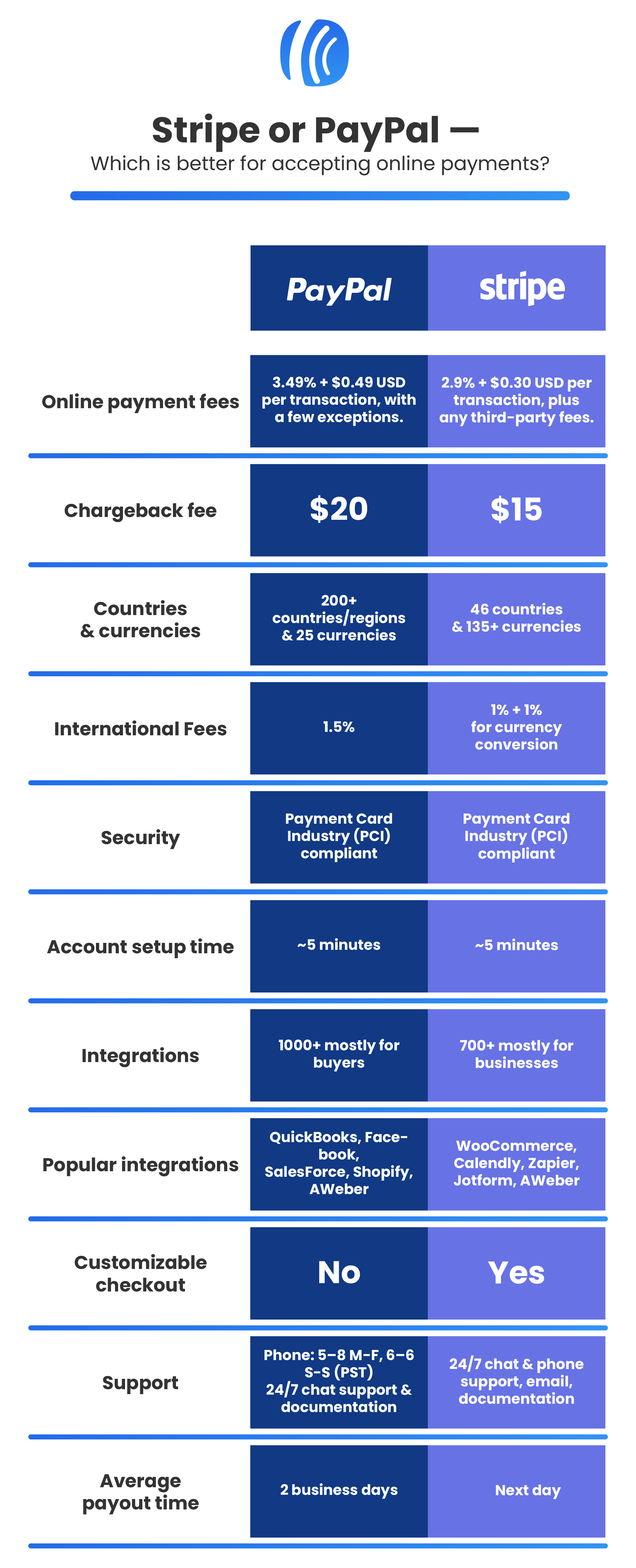
Conclusion: Stripe slightly wins out overall with better fees, support, and integrations. However, Stripe isn’t available with all sales software or in all countries, so PayPal is a great fallback option if Stripe isn’t right for you.
Download a PDF of the side-by-side comparison.
Stripe vs PayPal: Fees
These fees are for people selling within the United States. Please check the fees in your own country.
Stripe’s fees are 2.9% + $0.30 USD for each transaction.
Most platforms with a direct Stripe integration will incur an additional fee on top of Stripe’s fees. For example, AWeber’s fee is an additional .6% if you have a Plus plan and 1% if you have a free or lite plan.
PayPal’s fees are 3.49% + $0.49 USD for each transaction, with a few exceptions.
Conclusion: The fees are similar, but in most cases Stripe is slightly cheaper. The fees for Stripe + AWeber Plus are slightly lower than PayPal.
Note: There are additional factors to the cost of payment processing, including international charges, donations, the credit card used, etc. Please take your business’s needs into account.
Stripe vs PayPal: Account setup process
Want to know what it takes to set up a Stripe account or a PayPal account? Here we’ll lay out all the steps, including what information you’ll need to get set up.
Setting up Stripe
Setting up a Stripe account is quick and easy. If you have all of your information on hand, the entire process should take around 5 minutes.
There are 2 main ways to sign up for a Stripe account: Through a third-party platform (like AWeber) or directly on their site.
To sign up for Stripe through AWeber, start with an Ecommerce button on your landing page, and click the link to connect to Stripe:
Then connect the integration.

From here, you can sign in to your existing account or create a new one for your business.
Here’s where you can set up a Stripe account on their site.
Follow these steps to set up an account:
- Type in your email address and create a strong password
- Verify your mobile phone number via text
- Add your physical address and the type of business you have (“individual” if you haven’t submitted any paperwork for it yet)
- Choose what your business offers. Add your website and description of services.
- Type in the text that will show on customer statements
- Add your legal name, email address, date of birth, phone number, and the last 4 digits of your social security number
- Add your bank account information (routing and account numbers)
- Review and approve all added information, then click to create an account
That’s it! You can then start creating products and selling them on AWeber landing pages or any other platform you use that integrates with Stripe.
Setting up PayPal
Setting up a PayPal account is also very easy, and should take 5 minutes or less if you have all of your information ready. You can actually set up an account in about 30 seconds, but will need to verify your business and connect a bank to process payments.
You can set PayPal up on their website and then create payment buttons to add to your website, online store, and landing pages.
If you already have a personal PayPal account, you can upgrade it to a business account under “settings.” However, we recommend setting up a separate account for your business.
Follow these steps to set up an account:
- Head to the PayPal home page and click “Sign Up” then choose “Business Account”
- Add your legal first and last name, email address, and create a password
- Click “Agree and create account” and then you’ll have an account set up
You’ll then need to verify your business:
- Add your business name, phone number, physical address
- Choose your business type (likely Individual/Sole Proprietorship if you haven’t filled out paperwork yet), product/service keywords, estimated monthly sales, and add your website if you have one
- Enter your social security number, date of birth, and home address
Lastly, confirm your email address and connect a bank account and you’re ready to start selling!
PayPal gives a few options of banks where you can simply log into your account with your login and password to connect the accounts.
If your bank isn’t listed, you can connect them with your routing and account numbers. PayPal will make 2 small deposits and one withdrawal to verify your account, which takes 2-3 business days.
Conclusion: Although both are extremely easy to set up PayPal slightly wins in terms of simplicity. You can set up an account in seconds, and simply verify it with your business details when you’re ready.
Stripe vs PayPal for email marketing
Since you have a 60-70% probability of selling to an existing customer, it’s likely you’re using email marketing to promote your goods (if not, you should be).
But to truly make the most sales from email marketing, you need to make it exceedingly easy for your customers to purchase from your emails.
So how do Stripe and PayPal compare when using them for email marketing?
Using Stripe in your email marketing
Stripe integrates with many website and landing page tools, which you can link to in your email.
So, for example, if you were selling some headphones, you could create an email with an image, price, description, and “Buy now” button.

The “Buy now” button could take you directly to a landing page or product page for these headphones. Better yet, if your landing page tool offers a direct-to-payment link, you can send buyers immediately to the purchase page. This is a good option for a stand-alone course or service.
Depending on the tools you use with Stripe, it works great in email marketing. Just make sure you check that your customers don’t have to click too many times before making the purchase.
Using PayPal in your email marketing
You can add a PayPal button to your email promotions very easily, and it’s extremely recognizable.
For example, if you were selling a career course, you could add a PayPal button to your email:

Most people know that clicking the “Buy Now” PayPal button means they’ll be taken directly to a purchase flow in PayPal. They aren’t being brought to a product page with more details.
The downside of this is that, in many cases, your customers might actually want some more information before deciding to buy. So if their option is pay straight away or nothing, they may choose nothing.
Conclusion: If you have a third-party tool you’re using with Stripe that can provide a branded experience and more information, Stripe offers more customization to sales via email marketing. However, if you’re looking for a quick purchase button to add to your emails, PayPal will be your fastest and easiest option.
Ideally, you’d have both and A/B split test the emails to see which works better for making sales to your audience.
When should I use Stripe, PayPal, or both?
If you’re trying to decide when to use Stripe vs PayPal, don’t overthink it: Here’s our quick guide:
Use Stripe if it integrates with your existing tools
If the website, landing page, CRM, or other tools you currently use integrates with Stripe, use it for your sales. Your life gets a lot easier when your tools connect with each other already, and you can make customizable checkout processes for your customers.
Use PayPal if Stripe doesn’t integrate with your existing tools
Don’t have any tools that currently integrate with Stripe? Create a PayPal account and use that instead. PayPal is extremely easy to set up and it works basically everywhere — either via direct link or an embeddable button. Plus, most — if not all — of your customers recognize the branding and know how to use it to make purchases.
Use both Stripe and PayPal to offer your customers options
Feel free to use both Stripe and PayPal in just about any situation — people love choices. The only exception is if you want to keep your product page extremely clean and simple — then pick one.
Stripe vs PayPal: Sales tracking
How can you check the sales you’re making with Stripe and PayPal? You have a couple of options, depending on the depth and convenience you’re looking for.
Get sales reports directly from the Stripe or PayPal platform
Stripe’s reporting dashboard offers tons of graphs and dashboards showing your sales, growth, customer information, and more.
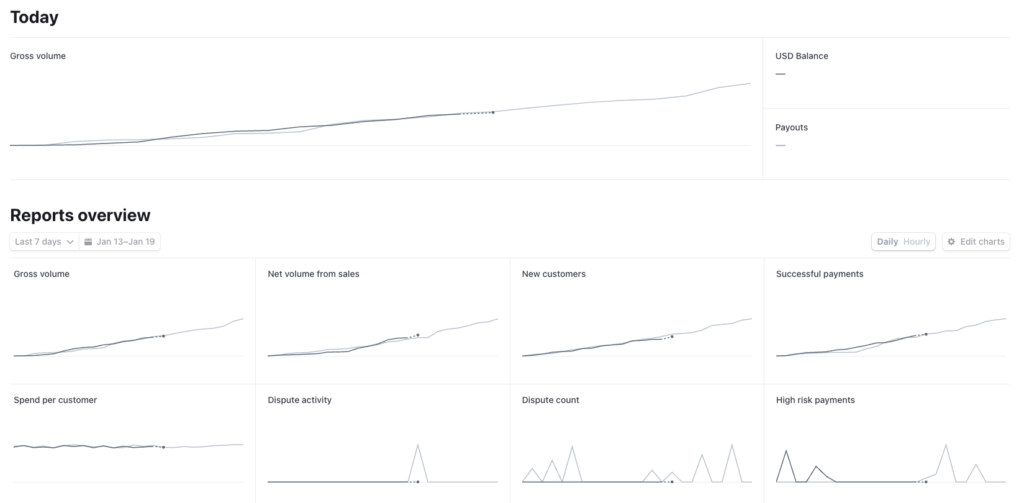
This data is very comprehensive, but can be overwhelming to look at and sometimes can be more information than you need, if you’re simply looking for an answer to “how many sales did I make today.”
PayPal offers a similar dashboard of information about your sales, but with less information on your customers. You can search for individual transactions, sales for new vs returning customers, filter by country, and get a 7, 30, or 90 day snapshot.
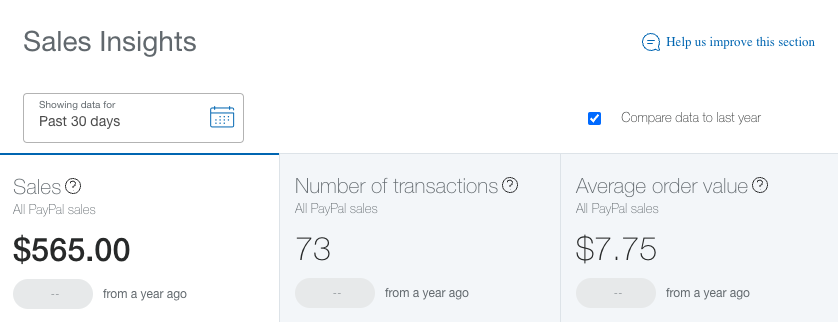
However, there is another option for quickly checking the sales you’ve made recently: A third party platform to which you have connected Stripe, PayPal, or both.
Get Stripe and PayPal sales reports in AWeber
Both Stripe and PayPal have integrations with hundreds of other platforms — many of which will offer sale reporting, too. Obviously, the information and reports will vary depending on the tool you use.
AWeber integrates with both Stripe and PayPal — if you set up the integrations with your accounts, you can get a report on your sales for either (or both) platforms.
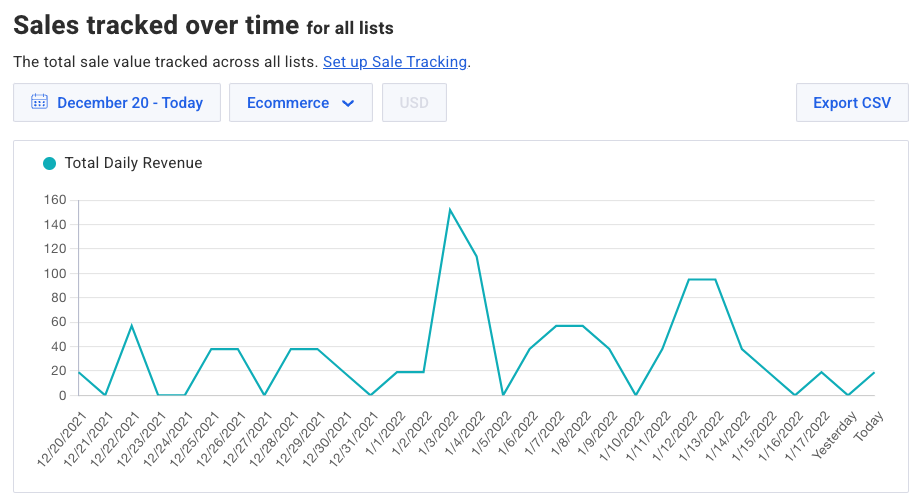
Here’s what the sales reporting dashboard looks like in AWeber (this shows both Stripe and PayPal sales in one place):
Also, check under a specific subscriber to see whether they’ve made a purchase, what they bought (based on tags), and even the most recent email they opened before making the purchase:

And, lastly, you can get a snapshot of all your sales made on your AWeber dashboard:
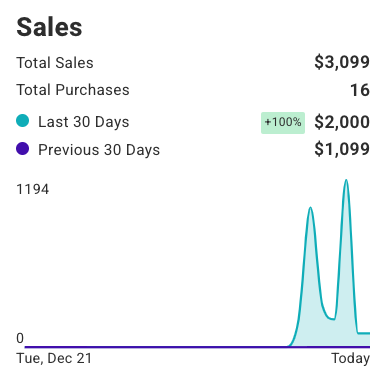
Conclusion: Check for the metrics that you really need for your business in Stripe vs PayPal, to ensure they’re there. But, if you’re like most small business owners, you’ll likely only need the basics on sales metrics so don’t overthink it.
Integrate Stripe and PayPal with AWeber
Have you made your decision? The next step is to integrate PayPal and Stripe with your existing systems.
If you use AWeber for email marketing (you can get started for free) make sure you set up your Stripe integration and PayPal integration so you can get all your sales reported right in your account.


Alexander
1/20/2022 4:08 pmYou forgot just a little nuance: PayPal freezes your money without warning and in large amounts, without ever giving it back.
Stripe doesnt.
https://finance.yahoo.com/news/paypal-lawsuit-freezing-customer-accounts-funds-073128563.html
Wendy Wagner
1/20/2022 4:54 pmhi there, I’m just rerading thru this and am wondering if by using say Stripe (cuz I already have Paypal) does it take the place of an email marketing app integrated with my shop?? So then I wouldn’t need an additional app for emails??
Just need to make sure what the deal is.
thanx a bunch,
Wendy
Kelsey Johnson
1/20/2022 5:09 pmHi Wendy,
You will need a separate email marketing tool whether you use PayPal or Stripe. AWeber integrates with both. 🙂
Evan Farr
1/20/2022 5:12 pmOne HUGE problem with PayPal is for large payments, they block the service provider’s access to the funds, as they don’t seem to play well with service providers, as they expect their customers are selling a product, and they want the product to be delivered to the customer before they release the funds. We are a law firm and we tried to use PayPal for a payment over $7000 and, even though we are a law firm that accepts payments frequently of $20-$30,000, they blocked our receipt of the funds for over a month, causing us to go through dozens of gyrations and waiting periods in order to get our money. Have not tried to do this with Stripe, but I assume it would be a much better process.
Susie Q
1/20/2022 5:25 pmAlthough PayPal’s fees are slightly higher, from a customer’s point of view, they are exceptional. Stripe on the other hand have now, 3 times, refused my bank card for payment to a seller for a product. No explanation, just declined. My bank says no problem with them & Stripe doesn’t disclose issues that they have with a seller, so normally the sale fails, unless the seller offers other payment methods, which normally they don’t. What is it about the setup that sellers have with Stripe that makes a payment fail when there are funds in the bank. No clue! I’ll stick with PayPal 🙂
Karim Nato
1/21/2022 5:15 amThere isn’t much difference between them to be honest, they vary a little bit but for all intents and purposes it is the same.
I use both on my website, you should give your customers as much choice as possible and use both, allowing customers to choose which payment method to use.
I used both stripe and paypal on my website. I prefer customers use stripe, they make accounting a lot simpler for me.
But the usefulness and convience of paypal from a customers point of view isn’t lost on me.
You could be having a lazy sunday at home, your wallet is somewhere in the house in your pant pockets (or handbag). With paypal you just have to log in and send payment. With stripe a card is required and that might just stop a sale from taking place.. because customer can’t find their wallet to pay.
I’m aware that stripe has gpay and I presume they just have to log in to gpay to use stripe. But far less people have gpay than paypal.
Kelsey Johnson
1/21/2022 12:25 pmThank you all for contributing your experiences with both payment platforms.
Just a note: AWeber has not verified any of these claims. However, we do think it’s important to hear real-life experiences from business owners.